Processing unix ”pmap” output of a JVM

Analysis of the output of

pmap

using R seemed to take forever. The functional programming style did not help much. But the code with comments is below.

I plan to use this code as part of a ‘nmon’ data analyzer. Code will be in github soon.


@ Set the current directory so that the graphs are generated there
this.dir <- dirname(parent.frame(2)$ofile) 
setwd(this.dir) 


#Split unix 'pmap' output. This line is like black magic to me at this time.
d <- do.call(rbind, lapply(strsplit(readLines("D:\\Log analysis\\Process Maps\\pmap_5900"), "\\s+"), function(fields) c(fields[1:10], paste(fields[-(1:10)], collapse = " "))))

#Now I am assigning some columns names
colnames(d) <- c("Address","Kbytes","RSS","Dirty Mode","Mapping","Test6","Test7","Test8","Test9","Test10","Test11")

#This section isolates and graphs mainly 'anon' memory sizes


#Aggregate and sum by type of memory allocation to get cumulative size for each type
Type2 <- setNames(aggregate(as.numeric(d[,"Kbytes"]), by=list(d[,"Test6"]),FUN=sum,na.rm=TRUE),c("AllocationType","Size"))

#I don't want this line. The extra braces in the original file have been added to the columns separately
Type2 <-subset(Type2, Type2$AllocationType != "[")

#Create data frame and cleanse
x<-data.frame(d[,7],d[,6],d[,2])
y<-subset(x, x[1] != "NA")
z<-data.frame(y[1],y[3])

png(
  "anonymous1.jpg",
  width     = 6.25,
  height    = 3.50,
  units     = "in",
  res       = 600,
)
par(mar=c(7,4,1,0))

colnames(z) <- c("AllocationType","Size")

# Split into rows of 100 each. This is not generic.
Type1Split<-split(z, sample(rep(1:3, 100)))
size<-data.frame(Type1Split[[1]]$Size)
colnames(size)<-c("Size")

#Plot the first set
barplot(as.numeric(levels(size$Size)[size$Size]),ylim=c(0,2000), names.arg=(paste(Type1Split[[1]]$AllocationType,Type1Split[[1]]$Size,"kb",sep=" ")),space=6, width=2, xlim = c(0, 1500), ylab="Kbytes",cex.names=0.3,las=2)

dev.off()

png(
  "anonymous2.png",
  width     = 6.25,
  height    = 3.50,
  units     = "in",
  res       = 600,
)
par(mar=c(7,4,1,0))

size<-data.frame(Type1Split[[2]]$Size)
colnames(size)<-c("Size")

#Plot the second set

barplot(as.numeric(levels(size$Size)[size$Size]),ylim=c(0,2000), names.arg=(paste(Type1Split[[2]]$AllocationType,Type1Split[[2]]$Size,"kb",sep=" ")),space=6, width=2, xlim = c(0, 1500), ylab="Kbytes",cex.names=0.3,las=2)

dev.off()

png(
  "anonymous3.png",
  width     = 7.25,
  height    = 3.50,
  units     = "in",
  res       = 600,
)
par(mar=c(7,4,1,0))

size<-data.frame(Type1Split[[3]]$Size)
colnames(size)<-c("Size")

#Plot the third set

barplot(as.numeric(levels(size$Size)[size$Size]),ylim=c(0,2000), names.arg=(paste(Type1Split[[3]]$AllocationType,Type1Split[[3]]$Size,"kb",sep=" ")),space=5, width=2, xlim = c(0, 1600), ylab="Kbytes",cex.names=0.3,las=2)

dev.off()


#This section isolates and graphs memory size of files loaded by the JVM

set.seed(10)

Type2Split<-split(Type2, sample(rep(1:2, nrow(Type2)/2)))

png(
  "pmap-node2.png",
  width     = 6.20,
  height    = 3.50,
  units     = "in",
  res       = 600,
)
par(mar=c(7,4,1,0))

barplot(Type2Split[[1]]$Size, width=1,xlim=c(0,820),ylim = c(0, 15000), space=8, ylab="Kbytes",col=c("violet"),names.arg=(paste(Type2Split[[1]]$AllocationType,Type2Split[[1]]$Size,"kb",sep=" ")), cex.names=0.3,las=2)

dev.off()

png(
  "pmap-node3.png",
  width     = 6.20,
  height    = 3.10,
  units     = "in",
  res       = 800,
)
par(mar=c(8,4,1,0)+0.3)


barplot(Type2Split[[2]]$Size, width=1,xlim=c(0,880),ylim = c(0, 4000), space=8, ylab="Kbytes",col=c("violet"),names.arg=(paste(Type2Split[[2]]$AllocationType,Type2Split[[2]]$Size,"kb",sep=" ")), cex.names=0.3,las=2)

dev.off()

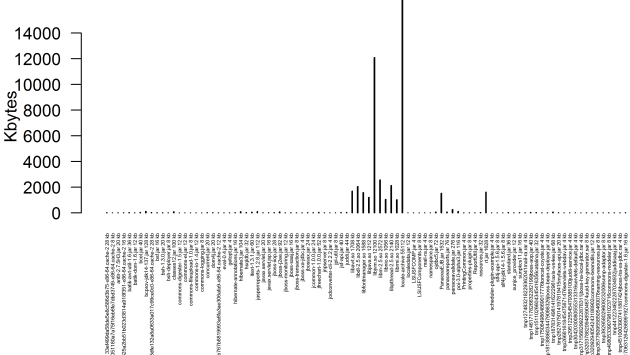
Graph of part of the JVM footprint showing files and memory sizes
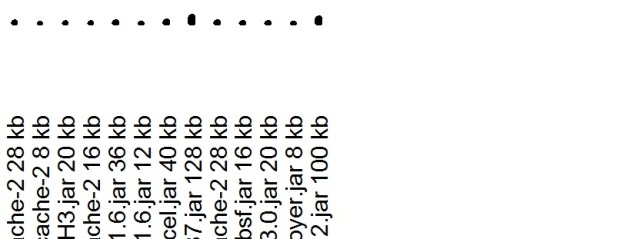
Blow up of the graph
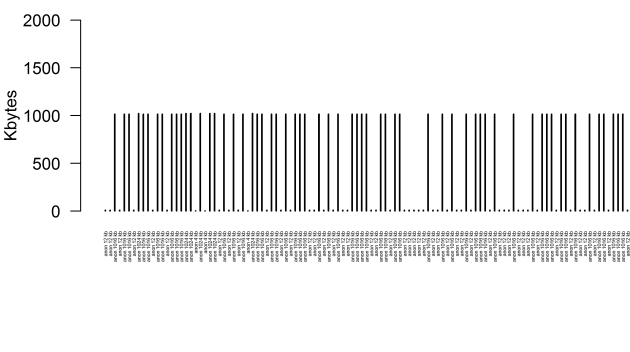
Graph of the ‘anon’ and memory sizes which we thought was a problem
Blow up of the graph

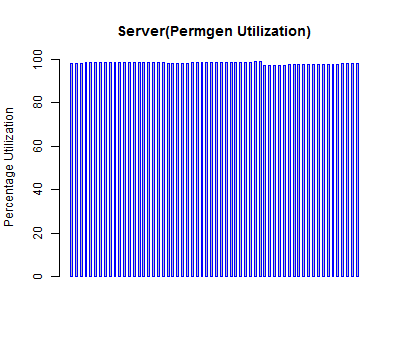
“R” graph showing permgen utilization

Sample of Data gathered using jstat

P – Permanent space utilization as a percentage of the space’s current capacity

  S0     S1     E      O      P      YGC     YGCT    FGC    FGCT     GCT
 77.25   0.00  84.44  57.48  98.13   1136   39.241   129  244.316  283.558

R code

this.dir <- dirname(parent.frame(2)$ofile) 
setwd(this.dir) 
png(file="permgen.png",width=400,height=350,res=72)
data = read.table("D:\\Log analysis\\gcutil",header=T)
barplot(data$P,data$FGCT, space = 1.5, ylim = c(0, 100), ylab="Percentage Utilization", border="blue")
title(main="Server(Permgen Utilization)")
dev.off()

Graph

Permgen Utilization

”R” code kata

This started as a ‘R’ code kata. I came across some Nmon reports from a AIX machine.

There is an nmon analyzer too available in IBM’s website.

The goal here is to learn to write ‘R’ code to ‘grep’ for lines that have information for CPU’s like this

CPU01,T0001,7.6,28.9,1.3,62.1
CPU02,T0001,4.9,6.5,1.1,87.5
CPU03,T0001,2.4,2.1,0.4,95.1
CPU04,T0001,2.9,1.4,0.8,94.9

Not only that. I also want to draw graphs for individual CPU’s and find if there are correlations between different CPU utilizations. This type of analysis is described in some papers published by ‘Computer Measurement Group’. I don’t have the links now but I plan to post more about this along with the graphs.

At this time this is not a serious performance planning measure. But it should be possible to use ‘R’ code to create a good nmon analyzer report.

This initial version of the code executes but it is not complete.

YAML configuration

path:
 input : D:\R\R-3.0.0\bin\MACHINE_130525_0000.csv
 output : D:\R\R-3.0.0\bin

Main code


library(yaml)
library(stringr)

# Set to load the configuration file.
# It might be set elsewhere also.
this.dir <- dirname(parent.frame(2)$ofile) 
setwd(this.dir) 

# Read nmon report and filter CPU utilization
filelist.read <- function(){
	config = yaml.load_file("config.yml")
	print(config$path$input)
	output <-(config$path$output)
	nmon <-file(config$path$input, "r")
	fileConn<-file(paste(output,"\\output.txt", sep = ""),"w")

	files <- NULL

	while(length(line <- readLines(nmon, 1)) > 0) {
		files <- line.filter( line )
		if (length(files) != 0) {
			writeLines(files, fileConn)
			#print(files)
			files <- NULL
		}
	}
	close(nmon)
	close(fileConn)
}

#filter based on a regular expression
line.filter <- function(line){
	filteredline <- grep("^CPU", line, value = TRUE)
	return (filteredline)
}


#Write each CPU's utilization data into a 
#separate file
filelist.array <- function(n){
  cpufile <- list()
  length(cpufile) <- n
  for (i in 1:n) {
    cpufile[[i]] <- paste("output", i, ".txt", sep = "") 
    print(cpufile[i])	
  }
}
#Write each CPU's utilization into a 
#separate file
filelist.array <- function(n){
         cpufile <- list()
         length(cpufile) <- n
         for (i in 1:n) {
            cpufile[[i]] <- paste("output", i, sep = "")
            print(cpufile[i])
         }
}

RUnit

library(RUnit)

#Sample test
test.filelist.array <- function() {
	filelist.array(3)
}

RUnit test runner

library(RUnit)

# Set to load sources and test code
# properly.
this.dir <- dirname(parent.frame(2)$ofile) 
setwd(this.dir) 

source('nmon.R')
source('unitTests/nmontestcase.R')
test.filelist.array()

Parse JSP using BeautifulSoup

I had to parse a tangle of JSP’s to identify how many HTML controls were calling JavaScript
functions that make AJAX calls back to the application.

So if a ‘key press’ event is fired when a user ‘tabs out’ or presses ‘Enter’ on a
textbox then I wanted the scan to find that.

<html:text maxlength="30" onblur="blurAction(this)" onfocus="displayFieldMsg(this)" onkeydown="keyDownEvents(this)" onkeypress="keyPressEvents(this)" onkeyup="convertUCase(this)" property="txtExtCredit" size="40" style="text-align:left;" styleclass="inputfld"></html:text>

My python skills are rudimentary but this code is able to scan and show a list of ‘html:text’ Struts tags. PyDev eclipse plugin comes in handy for python development.

The code can be further enhanced for more complex scans which I plan to do.


from bs4 import BeautifulSoup
import fnmatch
import sys
import re
import os
import glob

class Parse:

    def __init__(self):
        print 'parsing'
        self.parse()
        #self.folderwalk()

    def parse(self):
        try:
            path = "D:\\path"

            for infile in glob.glob(os.path.join(path, "*.jsp")):
                markup = (infile)
                print markup
                soup = BeautifulSoup(open(markup, "r").read())
            
                data=soup.findAll(re.compile('^html:text'),attrs={'onkeypress':re.compile('^keyPressEvents')})
                for i in data:
                    print i
                     
        except IOError as e:
            print "I/O error({0}): {1}".format(e.errno, e.strerror)
        except:
            print "Unexpected error:", sys.exc_info()[0]
            print "Unexpected error:", markup


    # Not used at this time
    def folderwalk(self):

        rootdir = "D:\\path"
        folderlist =0, []
        
        #Pattern to be matched
        includes = ['*.jsp']
        
        try:
            for root, subFolders, files in os.walk(rootdir):
                for extensions in includes:
                    for filename in fnmatch.filter(files, extensions):
                        print filename
                        #folderlist.append()
        except IOError as e:
            print "I/O error({0}): {1}".format(e.errno, e.strerror)
        except:
            print "Unexpected error:", sys.exc_info()[0]

    
if __name__ == '__main__':
    instance = Parse()

IntelliJ IDEA anonymous class as Java 8 lambda

I recently started coding lambdas. This is partly to prevent my Java skills from getting rusted.

I found that IntelliJ IDEA has this interesting feature that allows an inner class to be shown as a lambda.

 public class Employee {

           public Employee( String name,int age){
               this.age = age;}

           interface CheckAge {boolean test(Employee p);
                 int age;
                 public int getAge() {
                       return 36;
                 }
 
           static void printEmployees( List<Employee> m, CheckAge ca ){
             for( Employee m1 : m ){
                System.out.println( ca.test( m1 ));
             } 
           }

           public static void main( String... argv ){

                List<Employee> employees= new ArrayList<Employee>();

                employees.add( new Employee( "Test", 29));

                printEmployees( employees,new CheckAge() {
                     public boolean test(Employee p) {
                         return p.getAge() >= 18;
                                  p.getAge() <= 35;}
                });
   }
 }


Lambda

The printEmployees method has an anonymous inner class and the screenshot shows
IntelliJ IDEA’s interpretation.

The product company I am working for is very far behind this type of technology curve and only technology evangelism might help.

Bounded wildcard

I have been interviewing candidates for the position of software architect. Invariably I find that the candidates’ knowledge is at a cursory level. This is surprising because the person has atleast 10 years’ experience or more. The offshore environment has muddled these people because they are never allowed to own the entire software stack including the deployment architecture. There is always a foreign architect who guides them and ensures that they don’t have wide knowledge of architectural concerns.

They also don’t have to be aware of the latest Java developments. So a question about generics which was introduced several years back elicits no response.

I am interested in learning about generics but sometimes I am befuddled by the complexity. ‘Effective Java’ by Bloch has some good advice. One of it is shown below.


public interface Parent extends Comparable< Parent> {
}

public interface Child< T> extends Parent{

}

public class Compare {

//Incorrect Test method
// public static < T extends Comparable< T>> T compare(List< T> list){
//
// return list.get(0);
// }

//Correct Test method
public static < T extends Comparable< ? super T>> T compare( List< ? extends T> list){

   return list.get(0);
}

public static void main( String... s ){

    List< Child< ?>> children = new ArrayList< Child< ?>>();
    compare( children );

}
}

The correct way to use bounded wildcards to compile this method is shown in the book. If one uses the incorrect method it does not compile. The reason is that Child instances are not only comparable to themselves but also to Parent instances.

Generics is one subject that makes me think that even after reading a very good explanation I am still at a loss. But I want to capture patterns like this.

Graph model

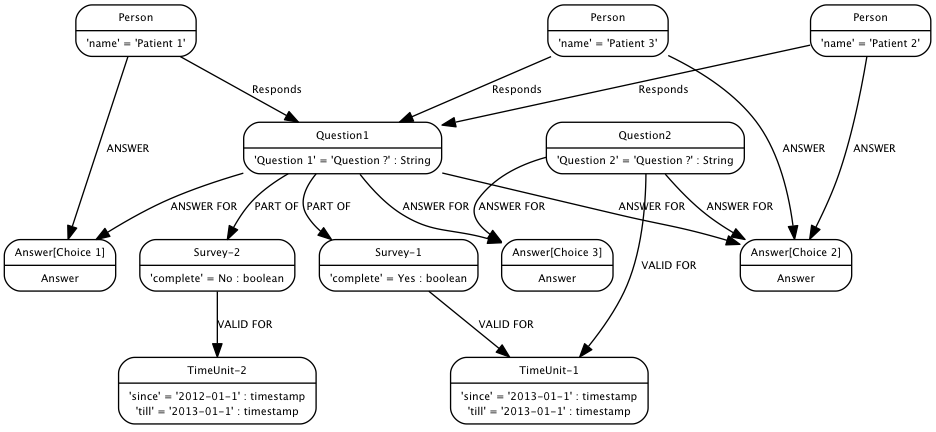
Deliver an online site where patients can view and respond to a series of questions that help to determine their eligibility for a clinical trials*. A patient should be able to save their data and come back at a later date to update or complete the survey. 

I was asked to draw a model for surveys recently. The surveys have questions and answers. A few years back I worked on a system that popped up questions in order to diagnose problems reported by customers. So based on the answers new questions will be posed on a site to enable diagnosis. So at that time we used a RDBMS and it did not seem to be a natural way of representing complex branches of questions and answers.

Now I realize a graph model represented in Neo4J graph DB can be a more flexible model. So a graph looks like a more realistic model of a survey.


  1. A proper model matching the problem
  2. Versioning and storage of historical records of entire surveys are possible
  3. Querying for historical records based on timestamped versions is possible. In this case ‘TimeUnit’ can be shown as a first-class graph node and not just data in a RDBMS.
  4. Reusability of answers and questions are clearly represented.

I am neither a RDBMS expert or a graph expert but the model shown below seems flexible enough.

Image


Java Lambda

I have only lean pickings especially during this recession. But this is my first Java Lambda. I have worked with Clojure in the past and I can relate to that.

There is enormous power in lambda’s and I hope to explore it further.

package com.test.lambda;
import java.util.concurrent.Callable;
import java.util.concurrent.ExecutorService;
import java.util.concurrent.Executors;
import java.util.concurrent.FutureTask;

public class Lambda {

  /* @param args*/
 
  public static void main(String[] args) {

    Runnable r = () -> System.out.println("Test Lambda");
    ExecutorService executor = Executors.newFixedThreadPool(2);
    executor.execute(r);
    executor.shutdown();
  }
}

Compiled with
openjdk version “1.8.0-ea”
OpenJDK Runtime Environment (build 1.8.0-ea-lambda-nightly-h3207-20130205-b76-b00)
OpenJDK 64-Bit Server VM (build 25.0-b15, mixed mode)

TOGAF Level 1 and Level 2 exam

Image I recently cleared the Level 1 and Level 2 exam together and I believe it was done the hard way. I read the entire TOGAF 9.1 guide two times and that was a weighty tome of about 600 pages. Initially I had a feeling that the topic was like dry dust but I didn’t attend any training session. So I grit my teeth and read all of it in addition to the Level 1 and Level 2 guides.

                    It starting making sense and I understood the subject well enough to confidently take the tests. In my case the guides did not help me get the full picture. The main book was more useful.

                    I have been a technical lead all along and I find that Enterprise Architecture is interesting and it has to work closely with Business Planning, Project/Portfolio management and Operation management. So it requires several skills apart from technical knowledge.

                     The huge set of diagrams recommended to be used in the various phases of the Architecture Development Method(ADM) was another aspect that I liked very much. There is more to write about this at a later stage but it was a refreshing exercise on the whole.

aioug conference Sangam 2011

Last year I visited Bangalore with the intention of presenting at the aioug conference Sangam 2011. The turnout was poor but my slides were posted here. It is about concurrency.