Apache Mahout

I followed this tutorial. Mahout seems to be an easy way to test Machine Learning algorithms using the Java API.

But I would use this  this R code instead of the one shown in the tutorial to convert the MovieLens dataset to CSV format.

r<-file("u.data","r")
w<-file("u1.csv","w")

while( length(data <- readLines(r)) > 0 ){
	writeLines(gsub("\\s+",",",data),w)
}

Time series forecast

This code counts how many values from the testing dataset fall within the 95% Confidence Interval range.

library(forecast)
library(lubridate)  # For year() function below
dat=read.csv("~/Desktop/gaData.csv")
training = dat[year(dat$date) < 2012,]
testing = dat[(year(dat$date)) > 2011,]
tstrain = ts(training$visitsTumblr)
sum <- 0
 fit <- bats(tstrain)
 fc <- forecast(fit,h=235)
 mat <- fc$upper
 for(i in 1:nrow(mat)){
     v <- data.frame(mat[i,])
     print(paste(testing$visitsTumblr[i],v[1,] , v[2,]))
     if(testing$visitsTumblr[i] > v[1,] & testing$visitsTumblr[i] < v[2,]){
	sum <- sum + 1
     }
 }
     print(sum)

The forecast object has this type of data(Lo 95 & Hi 95) which I use.

> fc
    Point Forecast     Lo 80    Hi 80     Lo 95    Hi 95
366       207.4397 -124.2019 539.0813 -299.7624 714.6418
367       197.2773 -149.6631 544.2177 -333.3223 727.8769
368       235.5405 -112.0582 583.1392 -296.0658 767.1468
369       235.5405 -112.7152 583.7962 -297.0707 768.1516
370       235.5405 -113.3710 584.4520 -298.0736 769.1546
371       235.5405 -114.0256 585.1065 -299.0747 770.1556
372       235.5405 -114.6789 585.7599 -300.0739 771.1548

Web application stack

resthub
RestHUB

jhipster
JHipster

I really need to keep up with these new stacks.

Lasso fit

The code I was given

set.seed(3523)
library(AppliedPredictiveModeling)
data(concrete)
inTrain = createDataPartition(concrete$CompressiveStrength, p = 3/4)[[1]]
training = concrete[ inTrain,]
testing = concrete[-inTrain,]

This is the data

<- head(as.matrix(training))
    Cement BlastFurnaceSlag FlyAsh Water Superplasticizer CoarseAggregate
47   349.0              0.0      0 192.0              0.0          1047.0
55   139.6            209.4      0 192.0              0.0          1047.0
56   198.6            132.4      0 192.0              0.0           978.4
58   198.6            132.4      0 192.0              0.0           978.4
63   310.0              0.0      0 192.0              0.0           971.0
115  362.6            189.0      0 164.9             11.6           944.7
    FineAggregate Age CompressiveStrength
47          806.9   3               15.05
55          806.9   7               14.59
56          825.5   7               14.64
58          825.5   3                9.13
63          850.6   3                9.87
115         755.8   7               22.90

Lasso fit and plot

predictors <- as.matrix(training)[,-9]
lasso.fit <- lars(predictors,training$CompressiveStrength,type="lasso",trace=TRUE)
headings <- names(training[-(9:10)])
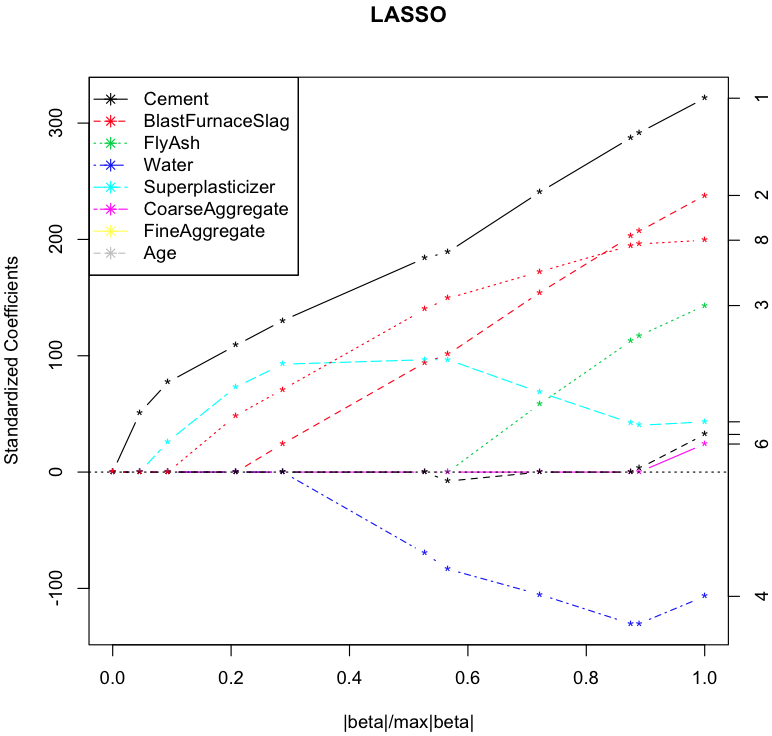
plot(lasso.fit, breaks=FALSE)
legend("topleft", headings,pch=8, lty=1:length(headings),col=1:length(headings))

Screen Shot 2014-09-26 at 9.34.44 AM

According to this graph the last coefficient to be set to zero as the penalty increases is Cement. I think this is correct but I may change this.

RandomForests

I am just posting R code at this time. The explanation is missing but I am making some progress.

library(ElemStatLearn)
library(randomForest)
data(vowel.train)
data(vowel.test)
> head(vowel.train)
y x.1 x.2 x.3 x.4 x.5 x.6 x.7 x.8 x.9 x.10
1 1 -3.639 0.418 -0.670 1.779 -0.168 1.627 -0.388 0.529 -0.874 -0.814
2 2 -3.327 0.496 -0.694 1.365 -0.265 1.933 -0.363 0.510 -0.621 -0.488
3 3 -2.120 0.894 -1.576 0.147 -0.707 1.559 -0.579 0.676 -0.809 -0.049
4 4 -2.287 1.809 -1.498 1.012 -1.053 1.060 -0.567 0.235 -0.091 -0.795
5 5 -2.598 1.938 -0.846 1.062 -1.633 0.764 0.394 -0.150 0.277 -0.396
6 6 -2.852 1.914 -0.755 0.825 -1.588 0.855 0.217 -0.246 0.238 -0.365
vowel.train$y <- factor(vowel.train$y)
set.seed(33833)
fit.rf <- randomForest(vowel.train$y ~ .,data=vowel.train)
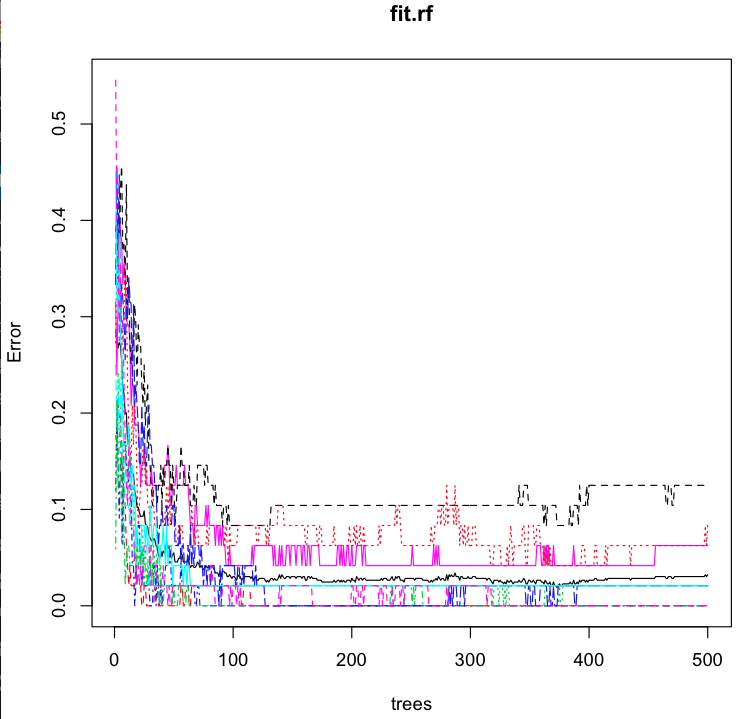
plot(fit.rf)
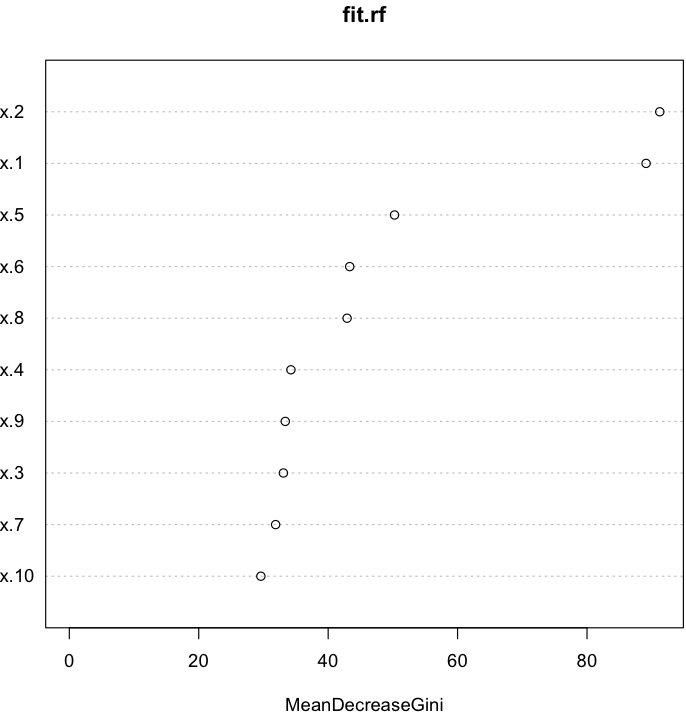
varImpPlot(fit.rf)

Screen Shot 2014-09-22 at 10.36.08 AM

I was asked to find the order of variable importance which this graph shows.

Screen Shot 2014-09-22 at 10.42.31 AM

Principal Component Analysis

library(caret)
library(AppliedPredictiveModeling)
set.seed(3433)
data(AlzheimerDisease)
adData = data.frame(diagnosis,predictors)
inTrain = createDataPartition(adData$diagnosis, p = 3/4)[[1]]
training = adData[ inTrain,]
testing = adData[-inTrain,]

I recently studied Predictive Analytics techniques as part of a course. I was given the code shown above. I generated the following two predictive models to compare their accuracy figures. This might be easy for experts but I found it tricky. So I post the code here for my reference.

Non-PCA

training1 <- training[,grepl("^IL|^diagnosis",names(training))]

 test1 <- testing[,grepl("^IL|^diagnosis",names(testing))]

 modelFit <- train(diagnosis ~ .,method="glm",data=training1)

 confusionMatrix(test1$diagnosis,predict(modelFit, test1))

Confusion Matrix and Statistics

Reference

Prediction Impaired Control

Impaired 2 20

Control 9 51

Accuracy : 0.6463

95% CI : (0.533, 0.7488)

No Information Rate : 0.8659

P-Value [Acc > NIR] : 1.00000

Kappa : -0.0702

Mcnemar’s Test P-Value : 0.06332

Sensitivity : 0.18182

Specificity : 0.71831

Pos Pred Value : 0.09091

Neg Pred Value : 0.85000

Prevalence : 0.13415

Detection Rate : 0.02439

Detection Prevalence : 0.26829

Balanced Accuracy : 0.45006

‘Positive’ Class : Impaired

PCA

training2 <- training[,grepl("^IL",names(training))]

preProc <- preProcess(training2,method="pca",thresh=0.8)

test2 <- testing[,grepl("^IL",names(testing))]

trainpca <- predict(preProc, training2)

testpca <- predict(preProc, test2)

modelFitpca <- train(training1$diagnosis ~ .,method="glm",data=trainpca)

confusionMatrix(test1$diagnosis,predict(modelFitpca, testpca))

Confusion Matrix and Statistics

Reference
Prediction Impaired Control
Impaired 3 19
Control 4 56

Accuracy : 0.7195
95% CI : (0.6094, 0.8132)
No Information Rate : 0.9146
P-Value [Acc > NIR] : 1.000000

Kappa : 0.0889
Mcnemar’s Test P-Value : 0.003509

Sensitivity : 0.42857
Specificity : 0.74667
Pos Pred Value : 0.13636
Neg Pred Value : 0.93333
Prevalence : 0.08537
Detection Rate : 0.03659
Detection Prevalence : 0.26829
Balanced Accuracy : 0.58762

‘Positive’ Class : Impaired

Open Government Data Platform India

Screen Shot 2014-09-14 at 1.23.02 PM

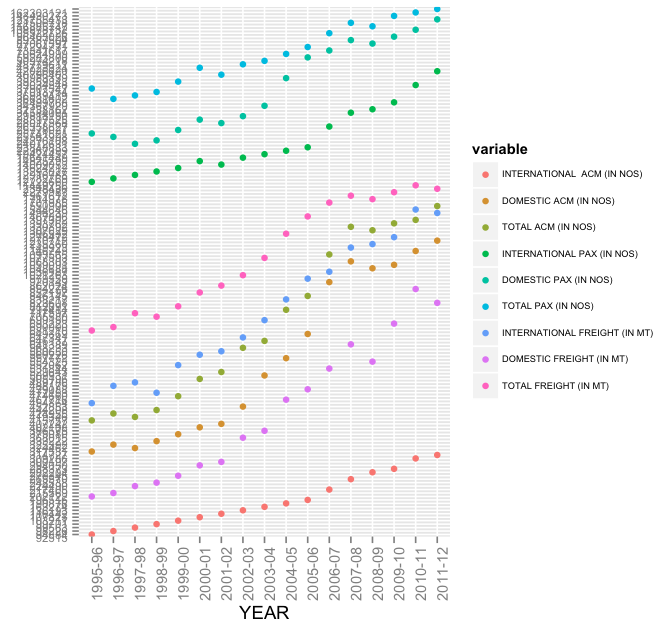
I found many datasets in this site but many of them are not useful. Some of them are just junk and others are not useful for predictive analytics.

But I found one that I actually used. The y-axis labels are smudged but that can be fixed.

Screen Shot 2014-09-14 at 1.30.45 PM
The data is JSON which I parsed.

library(RJSONIO)
library(ggplot2)
library(reshape2)
library(grid)
this.dir <- dirname(parent.frame(2)$ofile) 
setwd(this.dir)

airlines   = fromJSON("json")
df <- sapply(airlines$data,unlist)
df <- data.frame(t(df))
colnames(df) <- c( (airlines[[1]][[1]])[[2]], (airlines[[1]][[2]])[[2]], (airlines[[1]][[3]])[[2]], (airlines[[1]][[4]])[[2]], (airlines[[1]][[5]])[[2]], (airlines[[1]][[6]])[[2]], (airlines[[1]][[7]])[[2]], (airlines[[1]][[8]])[[2]], (airlines[[1]][[9]])[[2]],(airlines[[1]][[10]])[[2]] )

df.melted <- melt(df, id = "YEAR")
print(class(df.melted$value))
df.melted$value<-as.numeric(df.melted$value) 
df.melted$value <- format(df.melted$value, scientific = FALSE)
print(ggplot(data = df.melted, aes(x = YEAR, y = value, color = variable)) +geom_point() + theme(axis.text.x = element_text(angle = 90,hjust = 0.9))  + theme(axis.text.y = element_text(angle = 360, hjust = 1, size=7.5, vjust=1))+ theme(plot.margin =unit(c(3,1,0.5,1), "cm")) + ylab("")  + theme(legend.text=element_text(size=6)))

This is the sample data.

 head(df)
     YEAR INTERNATIONAL  ACM (IN NOS) DOMESTIC ACM (IN NOS) TOTAL ACM (IN NOS)
1 1995-96                       92515                314727             407242
2 1996-97                       94884                324462             419346
3 1997-98                       98226                317531             415757
4 1998-99                       99563                325392             424955
5 1999-00                       99701                368015             467716
6 2000-01                      103211                386575             489786
  INTERNATIONAL PAX (IN NOS) DOMESTIC PAX (IN NOS) TOTAL PAX (IN NOS)
1                   11449756              25563998           37013754
2                   12223660              24276108           36499768
3                   12782769              23848833           36631602
4                   12916788              24072631           36989419
5                   13293027              25741521           39034548
6                   14009052              28017568           42026620
  INTERNATIONAL FREIGHT (IN MT) DOMESTIC FREIGHT (IN MT) TOTAL FREIGHT (IN MT)
1                        452853                   196516                649369
2                        479088                   202122                681210
3                        488175                   217405                705580
4                        474660                   224490                699150
5                        531844                   265570                797414
6                        557772                   288373                846145

Decision Tree

This is a technique used to analyze data for prediction. I came across this when I was studying Machine Learning.

Tree models are computationally intensive techniques for recursively partitioning response variables into subsets based on their relationship to one or more (usually many) predictor variables.

> head(data)
  file_id time cell_id    d1    d2 fsc_small fsc_perp fsc_big    pe chl_small
1     203   12       1 25344 27968     34677    14944   32400  2216     28237
2     203   12       4 12960 22144     37275    20440   32400  1795     36755
3     203   12       6 21424 23008     31725    11253   32384  1901     26640
4     203   12       9  7712 14528     28744    10219   32416  1248     35392
5     203   12      11 30368 21440     28861     6101   32400 12989     23421
6     203   12      15 30032 22704     31221    13488   32400  1883     27323
  chl_big     pop
1    5072    pico
2   14224   ultra
3       0    pico
4   10704   ultra
5    5920 synecho
6    6560    pico
training <- createDataPartition(data$pop, times=1,p=.5,list=FALSE)
train <- data[training,]
test <- data[,training]

fol <- formula(pop ~ fsc_small + fsc_perp + fsc_big + pe + chl_big + chl_small)
model <- rpart(fol, method="class", data=train)
print(model)
n= 36172

node), split, n, loss, yval, (yprob)
* denotes terminal node

1) root 36172 25742 pico (0.0014 0.18 0.29 0.25 0.28)
2) pe=41300 5175 660 nano (0 0.87 0 0 0.13) *
11) chl_small=5001.5 9856 783 synecho (0.0052 0.054 0.0051 0.92 0.015)
6) chl_small>=38109.5 653 133 nano (0.078 0.8 0 0.055 0.07) *
7) chl_small< 38109.5 9203 166 synecho (0 0.0015 0.0054 0.98 0.011) *

Python vs Java Streams and lambda

I ported the first facebook Qualification Round Solution to Java 8.

The main idea is to count the frequency of each letter, then assign the value 26 to the most frequent letter, 25 to the next, etc. If two letters are tied for most frequent, it doesn’t matter which of them gets which value, since the sum will be the same. The python code below explains the solution pretty well.

I haven’t thoroughly checked for bugs but this is almost as beautiful as Python. Java is more verbose though.
I haven’t tested it thoroughly though.

import java.util.Map;
import java.util.TreeMap;
import java.util.stream.IntStream;

public class WordCount {
	
	public int x = 26;

	public static void main(String... argv){
		
		WordCount wc = new WordCount();
		wc.count();
	}

	private void count() {

		String s  = "__mainn__".replaceAll("[^a-z\\s]", "");

		System.out.println(s);
		

        final Map<Character, Integer> count = s.chars().
        		map(Character::toLowerCase).
                collect(TreeMap::new, (m, c) -> m.merge((char) c, 1, Integer::sum), Map::putAll);
        
             
        count.entrySet().stream().
        	sorted((l, r) -> r.getValue().compareTo(l.getValue())).
        		forEach(e -> count.merge(e.getKey(), x--, Math::multiplyExact));
                //Stop when x == 0.Not tested
        
        System.out.println(count.entrySet().stream().mapToDouble(e -> e.getValue()).sum());
	//Treating these numbers as double to sum them. Doesn't seem to matter.	
	}
}
mainn
a-1
i-1
m-1
n-2
{a=25, i=24, m=23, n=52}
124.0

Processed 0.25 TB on Amazon EMR clusters

I did that by provisioning 1 m1.medium Master node and 15 m1.xlarge Core nodes. This is easy and relatively cheap.
Since I deal with Pig I don’t have to design my MapReduce Jobs. I have to learn how to code MR jobs in the future.

This command stores the result in a file. I used to count the records in the file but I realized I don’t have to because the command actually prints how many records it writes.

store variable INTO '/user/hadoop/file' USING PigStorage();