Interface default methods

I am coding feverishly to complete a web interface to the JVM internals like memory, threads etc. This is my first set of default methods in an interface.

I have not read the JLS comparison between this and other inheritance mechanisms but this serves a purpose.

package com.memory.probe;

import java.io.IOException;
import java.io.PrintWriter;
import java.io.StringWriter;
import java.util.AbstractQueue;
import java.util.concurrent.ArrayBlockingQueue;

import javax.management.remote.JMXConnector;
import javax.management.remote.JMXConnectorFactory;
import javax.management.remote.JMXServiceURL;

import org.apache.log4j.Logger;

public interface Probe {
	
	Logger l = Logger.getLogger("generation.gc");
	
	AbstractQueue<Long> abq = new ArrayBlockingQueue<Long>(100);

	default void connectJMXRemote(int port){
	      JMXServiceURL url;
	  	try {
	  		url = new JMXServiceURL(
	  		            "service:jmx:rmi:///jndi/rmi://localhost:" + port + "/jmxrmi");
	  		JMXConnector jmxc = JMXConnectorFactory.connect(url, null);
	  		l.debug("Remote JMX connection is successful");
	  	} catch (IOException e) {
	  		l.debug(getStackTrace(e));
	  	}

	}
	
	default String getTrace(Throwable t){
		return getStackTrace(t);
	}
	
    static String getStackTrace(Throwable t){
    	StringWriter sw = new StringWriter();
    	PrintWriter pw = new PrintWriter(sw);
    	t.printStackTrace(pw);
    	return sw.toString();
    	
    }


}
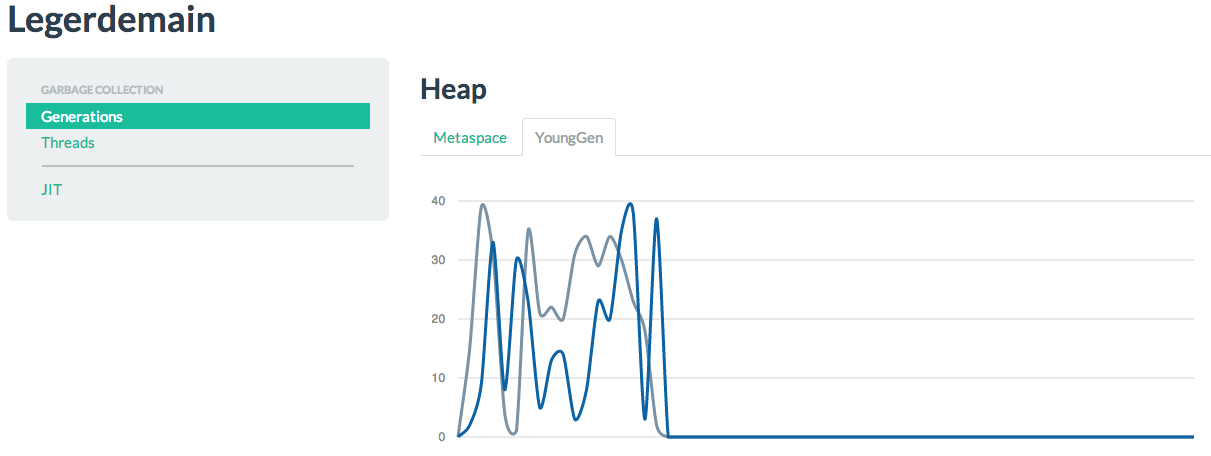
Real-time graph showing heap generations

I am able to dynamically update a graph in real-time with test data using the code shown in the previous post. The graph is refreshed without refreshing the entire browser. Even though the particular JavaScript graph library will be replaced with another better one, at this time the tests are successful.
Now I will be able to use JMX to get the YoungGen data from the heap and show actual data as the GC collects the garbage.

All the code will be pushed to Github.

Screen Shot 2014-06-23 at 11.10.36 AM

Update some columns of a R data frame

I wanted to code a R function that updates some columns in each row and not the entire row.

I declare a global variable to keep track of which row’s columns are being updated. I want to stop when the last row is reached.


youngdata <- function() {
    ydata <<- 1
}

This function creates a data frame which has 3 columns but valid data in only the first column. The 2nd and 3rd columns will be updated one row at a time.

youngdata <- function() {
  younggen <<- data.frame(lapply(as.Date('2014-08-06') + 0:0, seq, as.Date('2014/10/08'), '1 days'));
  younggen['eden'] <- 0
  younggen['survivor'] <- 0
  colnames(younggen) <- c("date","eden","survivor")
}

> younggen
date eden survivor
1 2014-08-06 0 0
2 2014-08-27 0 0
3 2014-09-17 0 0
4 2014-10-08 0 0


loadeddata <- function(df){
         if( ydata > nrow(df)){
             return
         }
         print("Loading new data")
         newdata <- data.frame(sample(1:40, 1, replace=F), sample(1:40, 1, replace=F),stringsAsFactors=FALSE)
         colnames(newdata) <- c("eden","survivor")    
         df[ydata,which(names(df) %in% names(newdata))]  <- newdata
 return(df)
 }

So every time the function loadeddata is called one row’s columns are updated and it stops when all the rows are finished. I increment ydata in another part of the code not shown here.

> younggen
date eden survivor
1 2014-08-06 2 16
2 2014-08-27 0 0
3 2014-09-17 0 0
4 2014-10-08 0 0

This code is used to test R-shiny’s ReactiveTimer that enables the code to dynamically update a graph with new data.

Compile rJava from source

I am trying to compile rJava from source on OSX 10.7.5 using

install.packages(“rJava”,type=”source”)

The motive is this. I am using code compiled with jdk1.8.0_05 and call it using rJava. When I do this there is a mismatch between the class file version of code compiled with jdk1.8.0_05 and the class files rJava recognizes.

llvm-gcc-4.2 -arch x86_64 -std=gnu99 -c -o rjava.o rjava.c -g -Iinclude -DRIF_HAS_CSTACK
-DRIF_HAS_RSIGHAND -mtune=core2 -g -O2 –
I/Library/Java/JavaVirtualMachines/jdk1.8.0_05.jdk/Contents/Home/jre/../include –
I/Library/Java/JavaVirtualMachines/jdk1.8.0_05.jdk/Contents/Home/jre/../include/darwin –
fno-common –
I/Library/Java/JavaVirtualMachines/jdk1.8.0_05.jdk/Contents/Home/jre/../include –
I/Library/Java/JavaVirtualMachines/jdk1.8.0_05.jdk/Contents/Home/jre/../include/darwin
llvm-gcc-4.2 -arch x86_64 -std=gnu99 -o libjri.jnilib Rengine.o jri.o Rcallbacks.o Rinit.o
globals.o rjava.o -dynamiclib -framework JavaVM -F/Library/Frameworks/R.framework/.. –
framework R -llzma -licucore -lm -liconv
ld: library not found for -llzma
collect2: ld returned 1 exit status
make[2]: *** [libjri.jnilib] Error 1
make[1]: *** [src/JRI.jar] Error 2
make: *** [jri] Error 2
ERROR: compilation failed for package ‘rJava’

I have installed xz using homebrew but that didn’t help.

rJava binaries are installed and working properly. It is the source compilation that causes this.

I have executed R CMD javareconf.

Java interpreter : /usr/bin/java
Java version : 1.8.0_05
Java home path : /Library/Java/JavaVirtualMachines/jdk1.8.0_05.jdk/Contents/Home/jre
Java compiler : /usr/bin/javac
Java headers gen.: /usr/bin/javah
Java archive tool: /usr/bin/jar
Non-system Java on OS X

trying to compile and link a JNI progam
detected JNI cpp flags : -I$(JAVA_HOME)/../include -I$(JAVA_HOME)/../include/darwin
detected JNI linker flags : -L$(JAVA_HOME)/lib/server -ljvm
llvm-gcc-4.2 -arch x86_64 -std=gnu99 -I/Library/Frameworks/R.framework/Resources/include –
DNDEBUG -I/Library/Java/JavaVirtualMachines/jdk1.8.0_05.jdk/Contents/Home/jre/../include –
I/Library/Java/JavaVirtualMachines/jdk1.8.0_05.jdk/Contents/Home/jre/../include/darwin –
I/usr/local/include -fPIC -mtune=core2 -g -O2 -c conftest.c -o conftest.o

llvm-gcc-4.2 -arch x86_64 -std=gnu99 -dynamiclib -Wl,-headerpad_max_install_names -undefined dynamic_lookup -single_module -multiply_defined suppress -L/usr/local/lib -L/usr/local/lib -o conftest.so conftest.o -L/Library/Java/JavaVirtualMachines/jdk1.8.0_05.jdk/Contents/Home/jre/lib/server -ljvm -F/Library/Frameworks/R.framework/.. -framework R -Wl,-framework -Wl,CoreFoundation

JAVA_HOME : /Library/Java/JavaVirtualMachines/jdk1.8.0_05.jdk/Contents/Home/jre
Java library path: $(JAVA_HOME)/lib/server
JNI cpp flags : -I$(JAVA_HOME)/../include -I$(JAVA_HOME)/../include/darwin

JNI linker flags : -L$(JAVA_HOME)/lib/server -ljvm
Updating Java configuration in /Library/Frameworks/R.framework/Resources
Done.

None of the solutions posted on the internet helped me until I manually downloaded xz-5.0.5.tar.gz into /usr/local and executed

    ./configure
    make
    make install.

rJava compiled successfully after this.

R Shiny

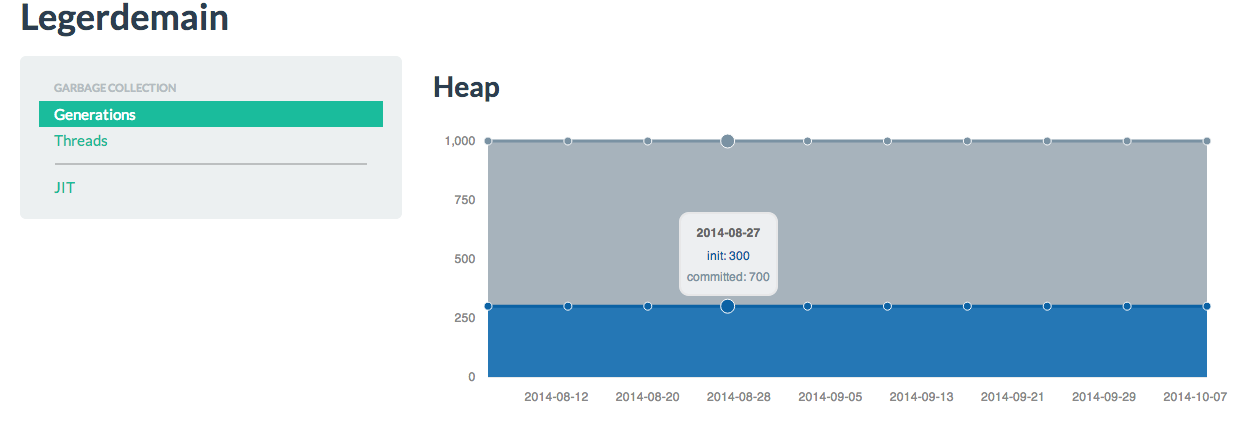
I have recently started to code a web dashboard to show information like heap usage in HotSpot. So initially I setup a Shiny server. The part that connects to HotSpot is not ready but this is my first Shiny UI. This is a Twitter BootStrap UI.

Part of the shiny server code is this. Now the data is generated by R code and later the data will be extracted from the JVM using JMX and other serviceability API’s.

output$metaspace <- renderChart({
  metacapacity <- data.frame(lapply(as.Date('2014-08-06') + 0:0, seq, as.Date('2014/10/08'), '1 weeks'));
  metacapacity['init'] <- 300
  metacapacity['committed'] <- 700
  colnames(metacapacity) <- c("date","init","committed")
  metacapacity  <- transform(metacapacity,date=as.character(date))
  ms <- mPlot(x = "date", y = c("init", "committed"), type = "Area", data = metacapacity)
  ms$addParams(height = 300, dom = 'metaspace')
  ms$set(title="MetaSpace")
  return(ms)
  })

CompletableFuture

The short definition of java.util.concurrent.CompletableFuture<T> is

A Future that may be explicitly completed (setting its value and status), and may be used as a CompletionStage, supporting dependent functions and actions that trigger upon its completion.

Code that conforms to the Reactive manifesto is all the rage now. The Play framework embodies it.

This example uses CompletableFuture and Apache HTTP Components to download data and react to its completion. I will update this as I learn more about the API and explain the asynchronous nature of this type of code.

public class ReactiveCompletion {

    ExecutorService executor = Executors.newFixedThreadPool(4);

    private void fetch() throws IOException{

        CountDownLatch latch = new CountDownLatch(1);
        CompletableFuture future =
        CompletableFuture.anyOf(CompletableFuture.supplyAsync(() -> streamData())
        .thenAccept(content -> {
            System.out.println("Completed");
            latch.countDown();
        })
        );
        try {
            latch.await();
        } catch (InterruptedException e) {
            System.out.println("Interrupted");
        }
    }

    private Content streamData(){
        Content content = null;
        try{
            CloseableHttpClient httpclient = HttpClients.createDefault();
            HttpGet httpget = new HttpGet("http://data.gov.in/node/104089/datastore/export/json");
            CloseableHttpResponse response = httpclient.execute(httpget);
            try {
                HttpEntity entity = response.getEntity();
                if (entity != null) {
                    Scanner in = new Scanner(new BufferedReader(new InputStreamReader(entity.getContent())));
                    while(in.hasNextLine() ){
                        System.out.println(in.nextLine());
                    }
                }
            } finally {
                response.close();
            }
        }catch (  IOException io){
            io.printStackTrace();
        }
        return content;
    }

    public static void main(String... argv) throws IOException {
        new ReactiveCompletion().fetch();
    }
}

Machine Learning Course

Screen Shot 2014-06-05 at 10.49.20 AM

Left-leaning Red-Black Trees

I think this is the easiest algorithm to learn and code. Robert Sedgewick’s Java code is always succinct. I have learnt how to code Tries based on his code. Now his Red-black tree code is easy to remember.

http://www.cs.princeton.edu/~rs/talks/LLRB/LLRB.pdf

Though the properties of this type of tree are different from the original Red-black tree I think it is sufficient to remember this condensed code.

These are the three lines and some small methods that we should remember mainly.

        if ( isRed(h.right) && !isRed(h.left)) h = rotateLeft(h);
        if ( isRed(h.left) && isRed(h.left.left)) h = rotateRight(h);
        if ( isRed(h.left) && isRed(h.right)) colorFlip(h);

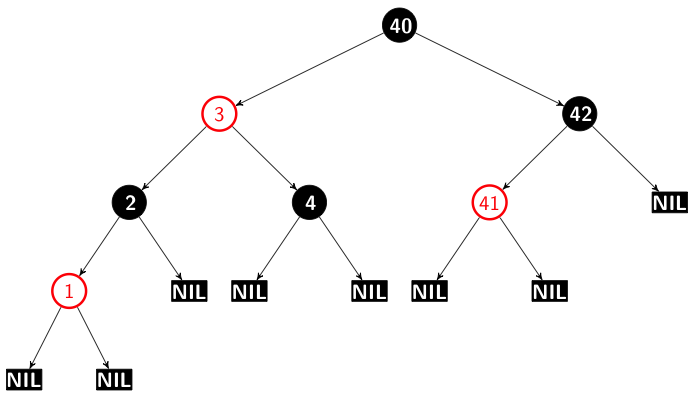
Original binary tree before rotation

Screen Shot 2014-06-02 at 9.43.10 AM

Final tree

Screen Shot 2014-06-02 at 9.50.41 AM

I think the fundamental rules are these apart from the other Red-black tree rules.

  1. Disallow right-leaning red nodes.
  2. Disallow more than two consecutive red nodes.

Red-Black Tree

I will refine this post as I code more methods. This is an attempt to learn this data structure and explain what I think I understand using pictures drawn using TEX. I use the tikz editor.

The algorithm code is based on pseudo-code from “Introduction to Algorithms” by Thomas H. Cormen et al. I use Java language features like enums etc. wherever possible.

Sample TEX code

[->,>=stealth',level/.style={sibling distance = 5cm/#1,
  level distance = 1.5cm}] 
\node [arn_n] {3}
    child{ node [arn_r] {2} 
 				child{ node [arn_nil] {NIL}}
    }
    child{ node [arn_r] {4}
							child{ node [arn_nil] {NIL}}
	}
;

Insert

public class RedBlack {

    private final Node SENTINEL= new Node();
    private Node root= new Node();

    public RedBlack() {
        root = SENTINEL;
    }

    enum Color {
        BLACK,
        RED};

    class Node{

        public void setColor(Color color) {
            this.color = color;
        }

        private Color color = Color.BLACK;

        Node left,right,p;
        int key;
    }

    public void insert( RedBlack tree,
                        Node z){
        
        Node y =  SENTINEL;
        Node x =  tree.root;
        
        while( x != SENTINEL){
            y = x;
            if ( z.key < x.key){
                x = x.left;
            }else
                x = x.right;
        }
        
        z.p = y;
        
        if( y == SENTINEL){
            tree.root = z;
        }else if ( z.key < y.key){
                z = y.left;
        }else{
                z = y.right;
        }
        z.left = z.right = SENTINEL;
        z.setColor(Color.RED);
    }
}

I check the colors like this.

    public void inOrder(Node x){

        if( x != SENTINEL){
            inOrder(x.left);
            System.out.println(x.key + "[" + x.color + "]");
            inOrder(x.right);
        }
    }

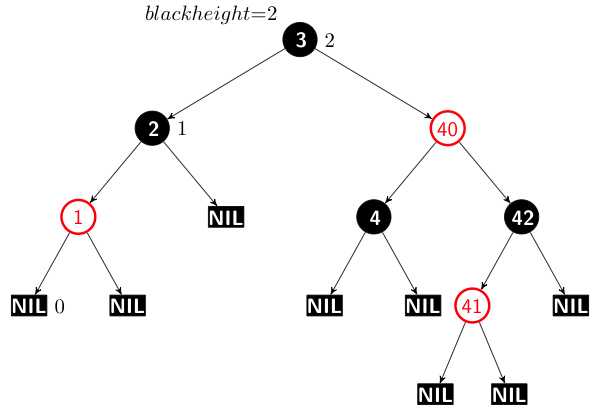
Now this tree has to be fixed so that it conforms to the rules that govern a Red-Black tree. So I code a method to fix it. This method is based on the pseudo-code from the same book. But I think there is a bug which I haven’t found. This tree after it is fixed looks like this.

Screen Shot 2014-06-01 at 1.17.01 PM

The black height property is 2.

The black height property for the left branch is 2 but it is 3 for one of the paths on the right.

I may have to read some other book because finding this bug is going to be hard.

Actually the tree should be like this.

Hackerrank’s Service Lane

I am again posting code without asymtotic analysis. There is no standard algorithm used here. I believe this problem pertains to Range Minimum Query algorithm which I hope to explore.

It is ridiculous that the code to parse the input values is more complex than the actual brute-force algorithm. Should Hackerrank parse it for us ?

import java.io.*;
import java.util.ArrayList;
import java.util.Arrays;
import java.util.Scanner;

public class Solution {

    private int noOfTestCases;

    private ArrayList<Integer> widths = new ArrayList<>();
    private ArrayList<Segment> tests = new ArrayList<>();

    OutputStream outputStream = System.out;
    PrintWriter pw = new PrintWriter(new BufferedWriter(new OutputStreamWriter(outputStream)));


    public void  getInput(BufferedReader br) throws IOException {
        Scanner s = null;
        int lengthHighway = 0;
        try {
            s = new Scanner(new BufferedReader(new InputStreamReader(System.in)));

            if (s.hasNextLine()) {
                String[] s1 = s.nextLine().split("\\s+");
                lengthHighway = Integer.parseInt(s1[0]);
                noOfTestCases = Integer.parseInt(s1[1]);
            }
            if (s.hasNextLine()) {
                String[] s1 = s.nextLine().split("\\s+");
                for( int i = 0 ; i < s1.length ; i ++){
                    widths.add( Integer.parseInt(s1[i]) );
                }
            }
            while (s.hasNextLine()) {
                String[] s1 = s.nextLine().split("\\s+");
                tests.add( new Segment(Integer.parseInt(s1[0]), Integer.parseInt(s1[1]) ));
            }
        } finally {
            s.close();
        }
    }

    class Segment{

        public final int entry,exit;

        public Segment(int entry, int exit) {
            this.entry = entry;
            this.exit = exit;
        }
    }

    public static void main( String... argv ) throws IOException {
        Solution rm = new Solution();
        BufferedReader br = new BufferedReader(new InputStreamReader(System.in));
        rm.getInput(br);
        rm.fit();

    }

   private void fit() {
        int[] vehicle = new int[]{1,2,3};

        try {
            for( Segment test : tests){
                Integer[] a  = Arrays.copyOfRange(widths.toArray(new Integer[widths.size()]), test.entry, test.exit+1);
                Arrays.sort(a);
                pw.println(vehicle[a[0]-1]);
                pw.flush();
            }
        }finally{
            pw.close();
        }
    }

}