PlantUML

There was a time when I was studiously reading UML 2 articles like this one about the UML 2 Composition Model.

This also reminds me of The Journal of Object Technology.

Its mission statement is this.

The Journal of Object Technology (JOT) is a peer-reviewed, free and open-access journal dedicated to the timely publication of previously unpublished research articles, surveys, tutorials, and technical notes on all aspects of object technology.

But I have never been able to draw the kind of UML 2 diagrams that Conrad Bock describes in his articles in the JOT. Visual Paradigm for UML is the tool that I think is the most flexible and I have used both the Community Edition as well as the licensed version. StarUML is good too but not as versatile as Visual Paradigm.
Later on I started using TikZ and PGF and Graphviz and liked them very much.
UML was passe but I still use it.

Recently I started using PlantUML for a code review project and it was like a whiff of fresh air. It uses Graphviz and there are IDE plugins. Everything was easy to learn and use. I could open IntelliJ IDEA and browse the code and also type the PlantUML Domain-specific language code and draw a complex UML 2 diagram.

It is easy for the developers to design their code.I wish they paid heed to someone.
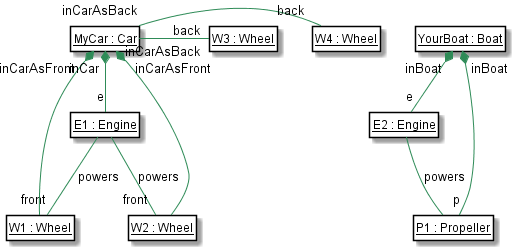
Composition Model

@startuml

skinparam class {
	BackgroundColor WHite
	ArrowColor SeaGreen
	BorderColor Black
}
class "<u>MyCar : Car"{
  +myMethods()
}

class "<u>YourBoat : Boat"{
  +myMethods()
}

class "<u>E2 : Engine"{
	String name
}

class "<u>P1 : Propeller"{
	String name
}

class "<u>E1 : Engine"{
	String name
}

class "<u>W1 : Wheel"{
	String name
}

class "<u>W2 : Wheel"{
	String name
}

class "<u>W3 : Wheel"{
	String name
}

class "<u>W4 : Wheel"{
	String name
}
"<u>E1 : Engine" -- "front"  "<u>W1 : Wheel" : "powers"
"<u>E1 : Engine" -- "front" "<u>W2 : Wheel" : "powers"
"<u>E2 : Engine" --  "<u>P1 : Propeller" : "powers"
"<u>YourBoat : Boat" "inBoat" *-- "p" "<u>P1 : Propeller"
"<u>YourBoat : Boat" "inBoat" *-- "e" "<u>E2 : Engine"
"<u>MyCar : Car" "inCarAsBack" *--  "<u>W1 : Wheel"
"<u>MyCar : Car" "inCarAsBack" *--  "<u>W2 : Wheel"
"<u>MyCar : Car" "inCarAsBack" -right--- "back" "<u>W3 : Wheel"
"<u>MyCar : Car" "inCarAsBack" -right--- "back" "<u>W4 : Wheel"
"<u>MyCar : Car" "inCar" *-- "e" "<u>E1 : Engine"

hide members
hide  circle

@enduml

Update 1:

The flow final activity is in the UML 2 spec. If it is not desired to abort all flows in the activity, use flow final instead. It is a circle with a cross inside. But I didn’t see that in the PlantUML doc.

How can I create it ?
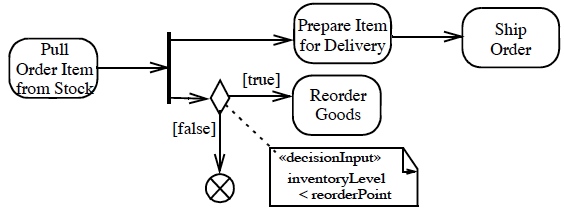
Flow final

The PlantUML team responded.

Well, it’s not possible today.

However, we propose that we have now 2 keywords :

stop (that will display the actual circle)
end (that will display a circle with a cross inside)

Update 2:

What’s New ?

7 June, 2015: Add end keyword in Activity Diagram Beta. (Thanks to Radhakrishnan Mohan for the suggestion).

Is this ok for you, or do you prefer to stay anonymous ?

PS : You can test the beta version here https://dl.dropboxusercontent.com/u/13064071/plantuml.jar

How to install Octave in Mac OS Yosemite ?

I was trying to execute my Octave scripts to recognize digits using a Neural Network. Octave did not work after I upgraded to Yosemite. Now it works after these steps. It may look simple but this wasted several hours.

brew tap homebrew/science

sudo chmod -R 777 /usr/local/share

brew link –overwrite xz

brew install gcc

I thought this prevented the gcc installation from completing.

==> ../configure –build=x86_64-apple-darwin14.3.0 –prefix=/usr/local/Cellar/gcc/5.1.0 –li
Error: Permission denied – /Users/radhakrishnan/Library/Logs/Homebrew/gcc

So I changed the permissions and tried again.

sudo chmod 777 /Users/radhakrishnan/Library/Logs/Homebrew

brew install gcc

sudo chmod -R 777 /usr/local/include/freetype2

brew link freetype

brew install octave –with-x11

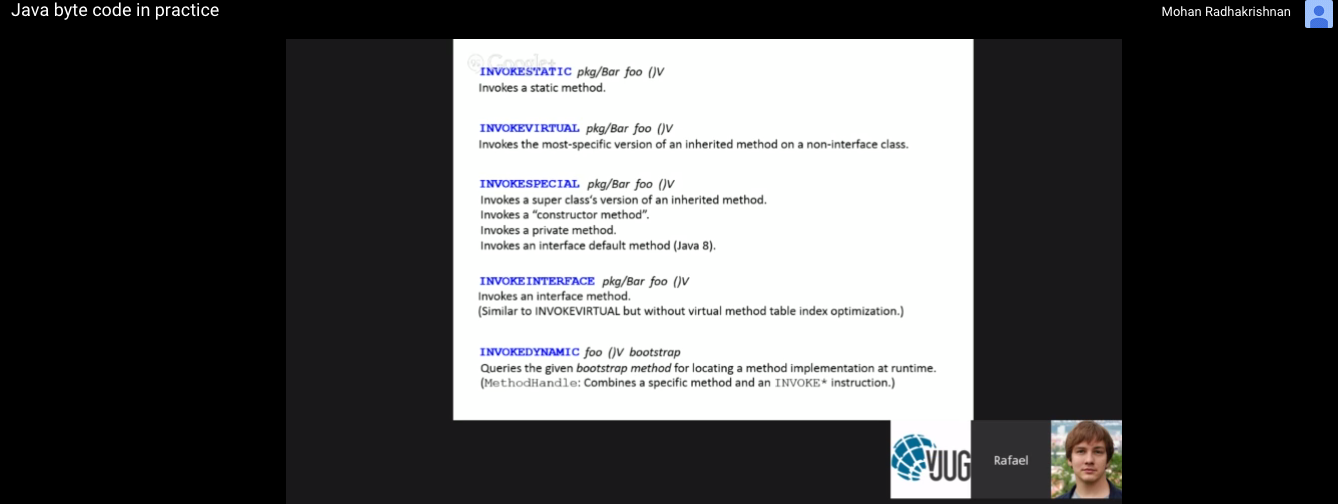
Java byte code in practice

I am listening to Rafael on Virtual JUG

Screen Shot 2015-05-20 at 10.27.03 am

Deep learning course at the University of Oxford.: 2014-2015 and another MIT book

ML

I am viewing these Course materials with a feeling of awe. I hope these resources provide some fodder for this blog and my imagination.

One more.

An MIT Press book in preparation

Yoshua Bengio, Ian Goodfellow and Aaron Courville

DEEP LEARNING

One more.

The wonderful resources by Andrej Karpathy

‘mvn package’ through our debilitating NTLM proxy

I was morose, grief-stricken and close to tears when our evil corporate proxy stopped me from doing anything. Each tool needs a different type of parameters to pass through this proxy. I tried to use cntlm but that did not help. After many hours I realized that this settings.xml builds everything properly.

There are two proxy sections but I have not attempted to remove one. It is working as it is.

<settings xmlns="http://maven.apache.org/SETTINGS/1.0.0"
      xmlns:xsi="http://www.w3.org/2001/XMLSchema-instance"
      xsi:schemaLocation="http://maven.apache.org/SETTINGS/1.0.0
                          http://maven.apache.org/xsd/settings-1.0.0.xsd">
  <activeProfiles>
    <!--make the profile active all the time -->
    <activeProfile>securecentral</activeProfile>
  </activeProfiles>
  <profiles>
    <profile>
      <id>securecentral</id>
      <!--Override the repository (and pluginRepository) "central" from the
         Maven Super POM -->
      <repositories>
        <repository>
          <id>central</id>
          <url>http://repo1.maven.org/maven2</url>
          <releases>
            <enabled>true</enabled>
          </releases>
        </repository>
      </repositories>
      <pluginRepositories>
        <pluginRepository>
          <id>central</id>
          <url>http://repo1.maven.org/maven2</url>
          <releases>
            <enabled>true</enabled>
          </releases>
        </pluginRepository>
      </pluginRepositories>
    </profile>
  </profiles>
  <pluginRepositories>
    <pluginRepository>
      <id>central</id>
      <name>Maven Plugin Repository</name>
      <url>http://repo1.maven.org/maven2</url>
      <layout>default</layout>
      <snapshots>
        <enabled>false</enabled>
      </snapshots>
      <releases>
        <updatePolicy>never</updatePolicy>
      </releases>
    </pluginRepository>
  </pluginRepositories>
  <proxies>
    <proxy>
      <id>example-proxy</id>
      <active>true</active>
      <protocol>http</protocol>
      <host>proxy</host>
      <port>port</port>
      <username>user</username>
      <password>password</password>
      <nonProxyHosts>www.google.com|*.example.com</nonProxyHosts>
    </proxy>
    <proxy>
      <id>example-proxy</id>
      <active>true</active>
      <protocol>https</protocol>
      <host>proxy</host>
      <port>port</port>
      <username>user</username>
      <password>password</password>
      <nonProxyHosts>www.google.com|*.example.com</nonProxyHosts>
    </proxy>
  </proxies>
</settings>

JDK9 REPL

I have been building and quickly exploring various JDK 9 features during this past weekend.
There is a new REPL now among other gems. I will update this post as I explore it further.

Mohans-MacBook-Pro:openjdk radhakrishnan$ java -version
java version “1.9.0-ea”
Java(TM) SE Runtime Environment (build 1.9.0-ea-b61)
Java HotSpot(TM) 64-Bit Server VM (build 1.9.0-ea-b61, mixed mode)
Mohans-MacBook-Pro:openjdk radhakrishnan$ java -jar kulla-0.508-20150510054454.jar
| Welcome to JShell — Version 0.508
| Type /help for help

->

-> String s = “__mainn__”.replaceAll(“[^a-z\\s]”, “”);
| Added variable s of type String with initial value “mainn”

-> System.out.println(s);

-> mainn

-> final Map count = s.chars().map(Character::toLowerCase).collect(TreeMap::new, (m, c) -> m.merge((char) c, 1, Integer::sum), Map::putAll);
| Warning:
| Modifier ‘final’ not permitted in top-level declarations, ignored
| final Map count = s.chars().map(Character::toLowerCase).collect(TreeMap::new, (m, c) -> m.merge((char) c, 1, Integer::sum), Map::putAll);
| ^—^
| Added variable count of type Map with initial value {a=1, i=1, m=1, n=2}

-> int x = 26;
| Added variable x of type int with initial value 26

-> count.entrySet().stream().sorted((l, r) -> r.getValue().compareTo(l.getValue())).forEach(e -> count.merge(e.getKey(), x–, Math::multiplyExact));

-> System.out.println(count.entrySet().stream());
java.util.
-> stream.ReferencePipeline$Head@548a9f61

-> System.out.println(count.entrySet().stream().mapToDouble(e -> e.getValue()).sum());
124.0

Everything can be changed in the REPL. Nothing is final and it is ignored. That is what kulla-dev@openjdk.java.net told me.

Resolution for MacOS issue related to freetype

A new pull request is submitted.

git clone http://github.com/mohanr/adoptopenjdk-getting-started-kit.git

cd adoptopenjdk-getting-started-kit

git remote add upstream https://github.com/neomatrix369/adoptopenjdk-getting-started-kit.git

git fetch upstream

From https://github.com/neomatrix369/adoptopenjdk-getting-started-kit
* [new branch] Nashorn -> upstream/Nashorn
* [new branch] master -> upstream/master
Mohans-MacBook-Pro:adoptopenjdk-getting-started-kit radhakrishnan$ ls
LANGS.md cover.jpg cover_small.jpg en pt
Mohans-MacBook-Pro:adoptopenjdk-getting-started-kit radhakrishnan$ cd pt
Mohans-MacBook-Pro:pt radhakrishnan$ ls
AdoptOpenJDKLogo-100×100.png feedback.md
README.md handy-scripts-for-OpenJDK-developers.md
SUMMARY.md intermediate-steps
adopt-openjdk-getting-started known-issues
adoptopenjdk-projects openjdk-mailing-lists.md
advanced-steps openjdk-projects
binaries preparations.md
contribute.md source-code
contributors.md thanks_and_support.md
cover.jpg virtual-machines
Mohans-MacBook-Pro:pt radhakrishnan$ cd known-issues/
Mohans-MacBook-Pro:known-issues radhakrishnan$ ls
known_issues.md known_issues_sonarqube.md
known_issues_linuxunix.md known_issues_virtual_machine.md
known_issues_macos.md known_issues_windows.md
known_issues_mercurial.md
Mohans-MacBook-Pro:known-issues radhakrishnan$ cat known_issues_macos.md
# MacOS

The configuration fails because it does not find **freetype

configure: error: Could not find freetype!
configure exiting with result code 1

Check if **freetype** is installed

$ brew install freetype
Error: freetype-2.5.3_1 already installed
To install this version, first `brew unlink freetype’

Since it is already installed we configure like this.

$ bash configure –with-freetype-include=/usr/X11/include/freetype2 –with-freetype-lib=/usr/X11/lib
A new configuration has been successfully created in
/Users/radhakrishnan/OpenJDK/jdk9/build/macosx-x86_64-normal-server-release
using configure arguments ‘–with-freetype-include=/usr/X11/include/freetype2 –with-freetype-lib=/usr/X11/lib’.
Mohans-MacBook-Pro:known-issues radhakrishnan$ git commit -m “Resolution for MacOS issue related to freetype” known_issues_macos.md
[master 9173bc0] Resolution for MacOS issue related to freetype
1 file changed, 18 insertions(+)
Mohans-MacBook-Pro:known-issues radhakrishnan$ git push origin master
Counting objects: 10, done.
Delta compression using up to 8 threads.
Compressing objects: 100% (5/5), done.
Writing objects: 100% (5/5), 786 bytes | 0 bytes/s, done.
Total 5 (delta 3), reused 0 (delta 0)
To http://github.com/mohanr/adoptopenjdk-getting-started-kit.git
6f1c9e0..9173bc0 master -> master

EcmaScript6

I started with this code which motivated me to explore ES6 further.

        let m = new Map();

        m.set("x",3);
        m.set("y",5);

        for (let [k, value] of m.entries()) {
            m.set(k, (m.get(k) * 2))
        }

        for (let value of m.entries()){
            console.log('Value [' + value + ']');

        }

Earlier I had cooed with pleasure when I coded this.

Now I want to push my luck. So I managed to wangle this code in bits and pieces from some EcmaScript6 aficianodos 🙂

I find it hard to admit that this code is not easy even for someone who claims to have rich experience with Java and software !! Bugs in this code are a different matter altogether.

Moreover since the sorted order changes somehow the result is different than the result of the Java code but I don’t have the motivation to fix this. This is actually an investigation of EcmaScript6 after all.

        var map = new Map;
        Array.from("mainn")
            .map(c => c.toLowerCase())
            .forEach(c => map.set(c, (map.get(c) | 0) + 1));

        let a = [...map.entries()];

        var x = 26;
        a.sort(([k1, v1], [k2, v2]) => v1 < v2).forEach(([k, v]) =>
                                                        {
                                                            console.log( 'k [' + k + '] v [' + v * x--+ ']');
                                                        });
LOG: 'Value [m,1]'
LOG: 'Value [a,1]'
LOG: 'Value [i,1]'
LOG: 'Value [n,2]'

LOG: 'k [n] v [52]'
LOG: 'k [m] v [25]'
LOG: 'k [a] v [24]'
LOG: 'k [i] v [23]'

Build OpenJDK 9

The build was delayed by this error.

configure: error: Could not find freetype!
configure exiting with result code 1

It is already installed !!

localhost:jdk9 radhakrishnan$ brew install freetype

Error: freetype-2.5.3_1 already installed

To install this version, first `brew unlink freetype’

This helped.

Mohans-MacBook-Pro:jdk9 radhakrishnan$ bash configure –with-freetype-include=/usr/X11/include/freetype2 –with-freetype-lib=/usr/X11/lib

A new configuration has been successfully created in

/Users/radhakrishnan/OpenJDK/jdk9/build/macosx-x86_64-normal-server-release

using configure arguments ‘–with-freetype-include=/usr/X11/include/freetype2 –with-freetype-lib=/usr/X11/lib’.

Configuration summary:

* Debug level: release

* HS debug level: product

* JDK variant: normal

* JVM variants: server

* OpenJDK target: OS: macosx, CPU architecture: x86, address length: 64

Tools summary:

* Boot JDK: java version “1.8.0_45” Java(TM) SE Runtime Environment (build 1.8.0_45-b14) Java HotSpot(TM) 64-Bit Server VM (build 25.45-b02, mixed mode) (at /Library/Java/JavaVirtualMachines/jdk1.8.0_45.jdk/Contents/Home)

* Toolchain: clang (clang/LLVM)

* C Compiler: Version Apple LLVM version 6.0 (clang-600.0.57) (based on LLVM 3.5svn) Target: x86_64-apple-darwin13.4.0 Thread model: posix (at /usr/bin/clang)

* C++ Compiler: Version Apple LLVM version 6.0 (clang-600.0.57) (based on LLVM 3.5svn) Target: x86_64-apple-darwin13.4.0 Thread model: posix (at /usr/bin/clang++)

—– Build times ——-
Start 2015-04-26 08:23:02
End 2015-04-26 08:45:01
00:05:54 verify-modules
00:21:59 TOTAL
————————-
/bin/bash /Users/radhakrishnan/OpenJDK/jdk9/common/bin/logger.sh /Users/radhakrishnan/OpenJDK/jdk9/build/macosx-x86_64-normal-server-release/build.log /usr/bin/printf “Finished building targets ‘clean images’ in configuration ‘macosx-x86_64-normal-server-release’\n”
Finished building targets ‘clean images’ in configuration ‘macosx-x86_64-normal-server-release’

Scala Build Tool

Screen Shot 2015-04-21 at 10.18.24 am

I started off on the wrong foot in my newfound zeal to learn Scala. This is a simple installation that went horribly wrong. Shouldn’t this be an effortless setup ?

localhost:project radhakrishnan$ sbt

Java HotSpot(TM) 64-Bit Server VM warning: ignoring option MaxPermSize=384m; support was removed in 8.0

error: error while loading CharSequence, class file ‘/Library/Java/JavaVirtualMachines/jdk1.8.0_05.jdk/Contents/Home/jre/lib/
rt.jar(java/lang/CharSequence.class)’ is broken

(bad constant pool tag 18 at byte 10)

[error] Type error in expression

Project loading failed: (r)etry, (q)uit, (l)ast, or (i)gnore? i

[warn] Ignoring load failure: no project loaded.

I upgraded my JDK to 1.8.0_45

After that I see this.

sbt -v from the command line throws this

java.lang.IncompatibleClassChangeError: Found class jline.Terminal, but interface was expected

at jline.TerminalFactory.create(TerminalFactory.java:101)

at jline.TerminalFactory.get(TerminalFactory.java:159)

at sbt.ConsoleLogger$.ansiSupported(ConsoleLogger.scala:85)

at sbt.ConsoleLogger$.(ConsoleLogger.scala:79)

at sbt.ConsoleLogger$.(ConsoleLogger.scala)

at sbt.GlobalLogging$.initial(GlobalLogging.scala:43)

at sbt.StandardMain$.initialGlobalLogging(Main.scala:60)

at sbt.StandardMain$.initialState(Main.scala:69)

at sbt.xMain.run(Main.scala:28)

at xsbt.boot.Launch$.run(Launch.scala:55)

at xsbt.boot.Launch$$anonfun$explicit$1.apply(Launch.scala:45)

at xsbt.boot.Launch$.launch(Launch.scala:69)

at xsbt.boot.Launch$.apply(Launch.scala:16)

at xsbt.boot.Boot$.runImpl(Boot.scala:31)

at xsbt.boot.Boot$.main(Boot.scala:20)

at xsbt.boot.Boot.main(Boot.scala)

So I downloaded the SBT launcher JAR and replaced the old one with it. I don’t understand any of this but it is working now.

I also found that years of programming experience is no match for the newfangled Scala.