Practical AOP woes – Part I

I have spent quite a long time trying to configure WebSphere Portal to use AOP Load-Time Weaving.

I started with Ron Bodkin’s WebSphere ClassLoader Plugin idea but that did not work due to a bug. According to Ron the context ClassLoader is set to the bootstrap loader instead of the application’s loader.

Now I am trying to use AspectWerkz to do that same thing. On the one hand I am excited about AOP but on the other it is very difficult for ordinary people to implement practical usecases using servers like WebSphere etc.

My firm recently showed some interest in weaving logger statements into the application code.

This aspect allows us to print the value added to a list inside a method. So in this case it should print Test1. So if we want to log the value it is possible.

package com.test.aspect;
import java.util.ArrayList;
import java.util.List;
public class TestClass {
public void test(){
List list = new ArrayList();
list.add( new String( "Test1" ) );
}
/**
* @param args
*/
public static void main(String[] args) {
TestClass t = new TestClass();
t.test();
}
}

Here is the aspect

package com.aspect;
public aspect TestAspect {
pointcut test() : execution( * com.test.aspect.TestClass.test(..) );


before() : test(){
System.out.println( "Test" );
}
after() : cflow( test() ) && call( * java.util.List.add(..) ){
System.out.println( thisJoinPoint.getArgs()[ 0 ] );
}
}
JSF JSR 168 Portlet problem

We have been struggling to understand how the JSF Portlet bridges work in different versions of the IBM RAD. We are using RAD 7 and the bridge is different from the one we were using with RAD 6.

One saving grace is that the design of the JSF API is quite flexible. ViewHandlers are chained. So I could implement my own ViewHandler and it did not cause any problems for the ViewHandler that the bridge API implements.

I came across this JSR 301 and it looks like this is needed to ensure that the next version of the Portlet spec. works properly with JSF implementations.

Where is the deployed EAR ?

Offshore software development is very stressful. There is usually a client manager who wants something and a software lead who thinks that the manager is foolish. Recently I heard this conversation between the lead and the manager.

Manager : I want you to deploy the new EAR.

Lead : I don’t have any problem with that but you should know that it is not tested.

Manager : So you have the backup of the previous EAR ? If anything goes wrong we can deploy the backed-up EAR.

Lead : No. We don’t have that.

Manager : This is ridiculous. You are saying that the EAR is deployed but you don’t have it.

Lead : I’ve explained this many times. There is no EAR in the deployed location.

Manager : I don’t understand. Where is the previous EAR ?

At this point the software lead loses his temper.

hmmmm. There is no EAR in the deployed location in WebSphere ??

What is this command supposed to do ? It is the backup or atleast the previous EAR.

$AdminApp export FacesPortletTracker_PA_m3pfnqy C:/test/FacesPortletTracker.ear

Java 5.0 Enums – constant-specific methods

I recently used Java 5.0 Enums to represent directions in a compact way. These methods in the Enum are called constant-specific methods. Apart from type-safety they also provide constant-specific behaviour.


/*
* Enum representing the current direction and its left and right
* directions.
*/


public enum EnumDirection {


SOUTH( 1, "SOUTH" ){
public EnumDirection turnLeft() {
return EAST;
}


public EnumDirection turnRight() {
return WEST;
}
},


EAST( 2, "EAST" ){
public EnumDirection turnLeft() {
return NORTH;
}


public EnumDirection turnRight() {
return SOUTH;
}
},


NORTH( 0, "NORTH" ) {
public EnumDirection turnLeft() {
return WEST;


}
public EnumDirection turnRight() {
return EAST;
}
},
WEST( 3, "WEST" ){


public EnumDirection turnLeft() {
return SOUTH;
}
public EnumDirection turnRight() {
return NORTH;
}

};


public abstract EnumDirection turnLeft();


public abstract EnumDirection turnRight();


private String direction;


private int number;


EnumDirection( int number, String direction ) {
this.direction = direction;
this.number = number;
}


public String getDirection(){
return direction;
}


public String getDescription( ) {
switch( this ) {
case NORTH: return "NORTH";
case SOUTH: return "SOUTH";
case EAST: return "EAST";
case WEST: return "WEST";
default: return "Unknown Direction";
}

}


public static EnumDirection getDirection( int number ) {
switch( number ) {
case 0:
return EnumDirection.NORTH;
case 1:
return EnumDirection.SOUTH;
case 2:
return EnumDirection.EAST;
case 3:
return EnumDirection.WEST;
default:
return EnumDirection.EAST;
}

}


public void printString() {
System.out.printf("%s %d%n", NORTH, NORTH.direction);
System.out.printf("%s %d%n", SOUTH, SOUTH.direction);
System.out.printf("%s %d%n", EAST, EAST.direction);
System.out.printf("%s %d%n", WEST, WEST.direction);
}


public int getNumber() {
return number;
}


}

Snap Preview

So now the links in the blog have a snap preview. I am not sure how it happened. I tried to add it but could not figure out how to do that. Place your cursor on one of the hyperlinks. It is nice.

WebSphere Portal PUMA API

The details of our WebSphere Portal users are stored in IBM Tivoli LDAP server. This code prints what attributes of users are actually available and enables us to show them in a theme JSP. So our JSR 168 portlets have to further rely on IBM-specific code. Portability is really a lost cause.

try{

     javax.naming.Context ctx = new javax.naming.InitialContext();
     com.ibm.portal.um.PumaHome home = (com.ibm.portal.um.PumaHome)
     ctx.lookup("portal:service/usermanagement/Puma");
     PumaProfile profile = home.getProfile( request );
     List attributes = profile.getDefinedUserAttributeNames();
     User user = profile.getCurrentUser();
     Map map = profile.getAttributes(user, attributes);
     Iterator iterator = attributes.iterator();

      while (iterator.hasNext()) {
        String attribute = (String)iterator.next();
        System.out.println("["+ attribute +"][" +
                                  map.get(attribute) + "]");
     }

}catch( PumaSystemException pse ){
     System.out.println( "PumaSystemException" );
}catch( PumaModelException pme ){
     System.out.println( "PumaModelException" );
}catch( PumaMissingAccessRightsException pmare ){
     System.out.println( "PumaMissingAccessRightsException" );
}catch( Exception e ){
     System.out.println( "Exception" );
}

Java Regular Expression

Some of the requests from the client could be weird but they seem to serve their purpose. We have been using WebSphere portal and we were given the task of filtering the output rendered by the Portal. So I created a custom
HttpServletResponseWrapper and took a copy of the HTML before sending it to the browser. This part was easy.
A filter can be configured in the web.xml of wps.war since the Portal code itself is a WAR deployed on WAS. Stripping the HTML of certain tags and filtering it was more difficult.
I tried to use Java Regex. It worked for some cases but it was very hard to use it to massage nested HTML.

Regex is cool. The following code actually closes the ‘img’ tag. Regex can be used to close HTML tags easily if they are not nested too deeply and there no newlines .Nested HTML tags broken into separate lines are pretty hard to manipulate using Regex.

import java.util.regex.Matcher;
import java.util.regex.Pattern;


public class RegularExpression{


private String source =
"<img width=\"30\" height=\"18\" border=\"0\" src=\'/wps/images/dot.gif\' alt=\"\">";

public static void main( String[] argv ){
RegularExpression regex = new RegularExpression();
regex.changePattern();


}


public void changePattern(){
String content = source.replaceAll("<img[^>]+[>]", "$0</img> ");
System.out.println( content );

}

}

Experimenting with JSR 168 and WSRP

Experimenting with JSR 168 and WSRP

I recently started playing with portlets, mainly WSRP. It took me some time to figure out all the JSR 168 and WSRP terminology. It looked quite cool until I started using the tools. I used WebSphere portal UTE. My initial attempt to set up a WSRP channel between WebSphere and Liferay did not succeed because I assumed that it is going to be easy. It was not.

WebSphere portal UTE 5.0 does not have a complete GUI for enabling WSRP. So I pulled the WSRP4J code which uses maven 1.0 and not maven 2. I don’t know where this is specified and since I haven’t used maven before I wasted time trying to set it up with maven 2.

Now it looks like that I have to understand a slew of technology to really be very productive with WSRP and JSR 168. This could include Web service security, WSRP specification, JSR 168 specification, SOAP, WSDL and also the quirks of tools.

How do I understand this exception message if I don’t know the spec. ?

Consumer supplies a registrationHandle/registrationState pair that is not recognized by the Producer.

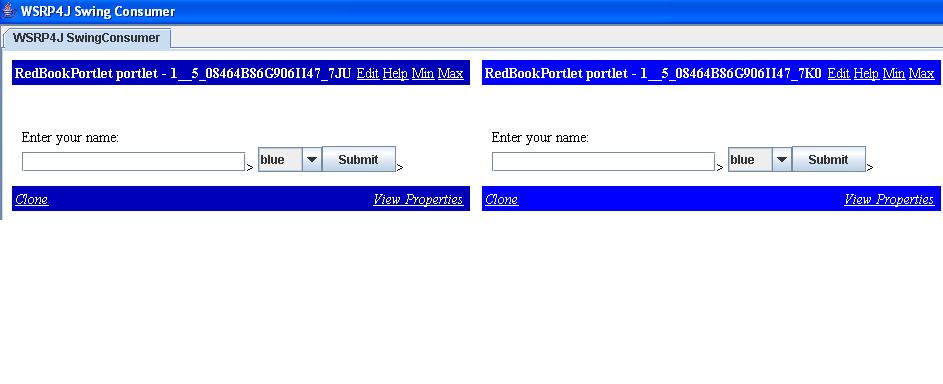
So I had to jump through several hoops just to view a simple WSRP portlet in the Swing consumer of WSRP4J.Aggregation of content using WSRP seems interesting. The following is the image of the WSRP4J Swing consumer showing a WebSphere portlet and its clone.

wsrp-portlet.JPG

WebSphere Portal and JSR 168

Initially we started migrating a project thinking that the JSR 168 standard is a totally portable way of writing portlets. After a few months of development we found that our code is sucked in by WebSphere portal. As much as we tried to, we coudn’t keep our code portable. All the navigation code including tag handlers became deeply embedded within the portal themes. Apart from that our authorization code now depends on the portal implementation.

We couldn’t figure out when WebSphere portal would support JSR 115. Our JSR 168 portlets are still portable but what use are they without the rest of the infrastructure provided by WebSphere Portal.

Writing Mixins using AspectJ

I recently wrote about AspectJ and mixins because this idea seemed to have more practical value than usual examples about logging etc.