Polyglot programming using Jenkins

jenkins Facility for languages develops when one does not squander existing opportunities to code. That is what I think.

Jenkins, the CI enabler supports a few languages like Python and Groovy. The Python package I used to make the Rest API calls is ‘Python Jenkins’.It is interesting to note that run_script executes Groovy code.

I didn’t test it exactly when the Unix server runs out of disk space but assumed the text from the console output will match.Moreover the encryption routine works as expected but the decryption function doesn’t work. It seems that since I call the Rest API there could be a encryption/decryption key mismatch.


'''
Created on Oct 12, 2016

@author: Mohan Radhakrishnan

This python module gets the console output of the latest
build and if the text 'No space left on device' is found in
the output it sends a mail.
I've taken liberties with the 'functional paradigm'

'''
import smtplib
import jenkins
import os
def main():

overrideenvironmentvariables()

server = jenkins.Jenkins('http://localhost:8080', username='Mohan', password='Welcome1')

notifydisaster(server)

'''
Notify
'''
def notifydisaster( server ):
print( getconsoleoutput(server) )
name,buildnumber,consoleoutput = getconsoleoutput(server)
if (consoleoutput.find("Caused by: java.io.IOException: No space left on device") != -1):
print("Caused by: java.io.IOException: No space left on device")
sendmail( name,buildnumber )

'''
Notify
Password Encryption/decryption code has to be tested and used
'''
def sendmail(name,buildnumber):
smtp = smtplib.SMTP('smtp.gmail.com', 587)
smtp.ehlo()
smtp.starttls()
smtp.login("x.y@z.com","Password")
smtp.sendmail('x.y@z.com', 'x.y@z.com', 'Subject: No space left on device\n \
Job ' + name + ' Build ' + str(buildnumber) + ' fails due to lack of disk space')

'''
Get the console output of the particular
Job's build
'''
def getconsoleoutput(server):
information = getJobName(server)
if information:
return information[ 0 ]['name'] ,getlastjobDetails(server),server.get_build_console_output(information[ 0 ]['name'], getlastjobDetails(server))

'''
Get Job and other details
and filter the Job we are interested in
'''
def getJobName(server):
jobs = server.get_all_jobs(0)
filtercriterion = ['CITestPipeline']

return list(filter( lambda d: d['fullname'] in filtercriterion, jobs))

'''
Get Job and other details
Return '0' as the build number assuming
it signifies that there is no such build number
'''

def getlastjobDetails(server):
information = getJobName(server)
if information:
last_build_number = server.get_job_info(information[ 0 ]['name'])['lastCompletedBuild']['number']
return last_build_number
else:
return 0

'''
Attempt here to encrypt Passwords using Jenkins' key
Not tested properly
'''
def encrypt(server ):
value = server.run_script("""
secret = hudson.util.Secret.fromString("Password")
println secret.getEncryptedValue()
println secret.getPlainText()
""")
print (value)

def decrypt(server ):
decryptedvalue = server.run_script("""
secret = hudson.util.Secret.fromString("aiJREkuBjWHX9UWIyhEzwnnAJReuZnQVEtUr0KgvXKg")
println hudson.util.Secret.toString(secret)
""")
print (decryptedvalue)
return decryptedvalue
'''
Override this proxy setting as we don't
need it and it causes an error.
'''
def overrideenvironmentvariables():
os.environ["HTTP_PROXY"] = ''

if __name__=="__main__":
main()
Spacemacs

I will update this post soon as my day job leaves little time for fun aspects like this.

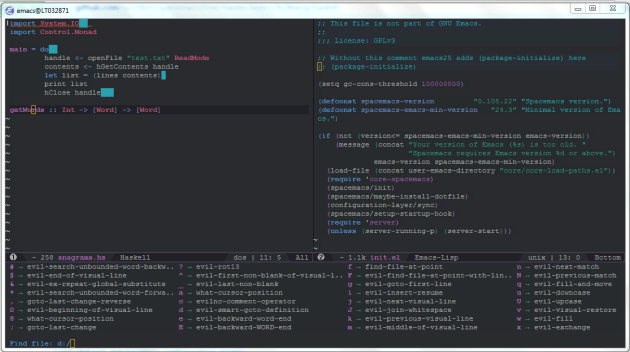
Spacemacs’ new Haskell layer is what I like now eventhough the Haskell editor setup is not easy for the novice.

After installing Spacemacs these are the basic steps I followed.

Added the Haskell layer

;; —————————————————————-
;; Example of useful layers you may want to use right away.
;; Uncomment some layer names and press (Vim style) or
;; (Emacs style) to install them.
;; —————————————————————-
;; auto-completion
;; better-defaults
emacs-lisp
(haskell .variables haskell-enable-shm-support t)
;; git
;; markdown
;; org
;; (shell :variables
;; shell-default-height 30
;; shell-default-position ‘bottom)
;; spell-checking
;; syntax-checking
;; version-control

Added this to .spacemacs

(defun dotspacemacs/user-init ()
“Initialization function for user code.
It is called immediately after `dotspacemacs/init’, before layer configuration
executes.
This function is mostly useful for variables that need to be set
before packages are loaded. If you are unsure, you should try in setting them in
`dotspacemacs/user-config’ first.”
(add-hook ‘haskell-mode-hook ‘turn-on-haskell-indentation)
(add-to-list ‘exec-path “C:/Users/476458/AppData/Roaming/local/bin/”)
)

C:/Users/476458/AppData/Roaming/local/bin/ contains other tools installed by Stack.

Stack is a cross-platform program for developing Haskell projects. It is aimed at Haskellers both new and experienced.

Spacemacs

Suggested by spacemacs Reddit group

(defun dotspacemacs/user-config ()
“Configuration function for user code.
This function is called at the very end of Spacemacs initialization after
layers configuration.
This is the place where most of your configurations should be done. Unless it is
explicitly specified that a variable should be set before a package is loaded,
you should place your code here.”
(spacemacs/set-leader-keys-for-major-mode ‘haskell-mode
“cx” ‘inferior-haskell-load-and-run
)
)

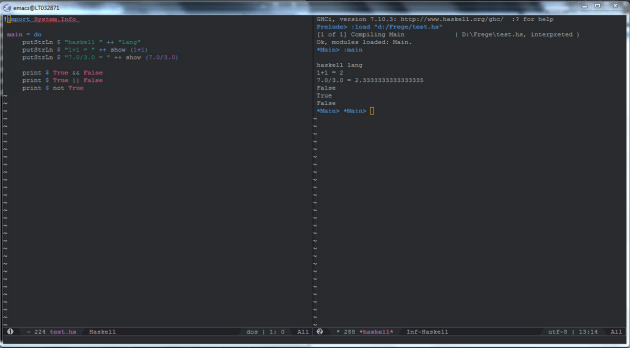
This helps me compile and execute the Haskell program by using the keystrokes

SPC m c x

Spacemacs1

Getting introduced to Matlab

There was a time when I thought Matlab is a tool used by engineers. Is it even possible for a student of humanities to get access to such tools ? It is and there are academic licenses.

Matrix

matrix = zeros(10,10);

matrix(1,2) = 3
matrix(2,2) = 30
matrix(1,3) = 2
matrix(4,3) = 14
matrix(5,2) = 199
matrix(6,2) = 733

\begin{bmatrix} 0 & 3 & 2 & 0 & 0\\ 0 & 30 & 0 & 0 & 0\\ 0 & 0 & 0 & 0 & 0\\ 0 & 0 & 14 & 0 & 0\\ 0 & 199 & 0 & 0 & 0\\ 0 & 733 & 0 & 0 & 0\\ \end{bmatrix}

Maximum value from a matrix
[max_value, node] = max(matrix(:));

fprintf ('Maximum value is %d and node is %d\n', max_value, node);

node seems to be a reference to the element which is used below to get the row and column using ind2sub.


[i, j] = ind2sub(size(matrix), node);

fprintf ('Row is %d and column is %d\n', i, j);

sub2ind gives the linear indice of the element when we have the row and column of the element.


linearindice = sub2ind(size(matrix), 1, 2);

fprintf ('Linear Indice is %d \n', linearindice);

Sort

I get the sorted matrix and also the matrix of indices of the sorted elements. Very useful.


[values, indices] = sort( matrix );
Sorted values

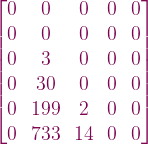
\begin{bmatrix} 0 & 0 & 0 & 0 & 0\\ 0 & 0 & 0 & 0 & 0\\ 0 & 3 & 0 & 0 & 0\\ 0 & 30 & 0 & 0 & 0\\ 0 & 199 & 2 & 0 & 0\\ 0 & 733 & 14 & 0 & 0\\ \end{bmatrix}

Indices of sorted values

\begin{bmatrix} 1 & 3 & 2 & 1 & 1\\ 2 & 4 & 3 & 2 & 2\\ 3 & 1 & 5 & 3 & 3\\ 4 & 2 & 6 & 4 & 4\\ 5 & 5 & 1 & 5 & 5\\ 6 & 6 & 4 & 6 & 6\\ \end{bmatrix}

Java 8 Optional

I think there are more elegant ways to check if Optional is empty or not but here I have to collect everything in a ArrayList. So I wasn’t able to include isPresent() in the lambda pipeline.

package com.test;

import java.util.*;
import java.util.stream.Collectors;
import java.util.stream.Stream;
public class OptionalTest {

    private static List<String> newImports = new ArrayList<>();

    public static Optional<List<String>> getOptionalNewImports() {

        return Optional.ofNullable(newImports);
    }

    public static void main( String... argv ){

        newImports.add("org.apache.struts");

        if( getOptionalNewImports().isPresent() ) {
            List<String> imports = new ArrayList<>();
                    getOptionalNewImports().get().stream()
                    .map(p -> "import " + p + ";")
                    .collect(Collectors.toCollection(() -> imports));
            imports.forEach( System.out::println);
        }

    }
}

This is the relevant method.

        public Optional<List<String>> getOptionalNewImports() {

            return Optional.ofNullable(newImports);
        }

This is a proper usage of ifPresent. I assign a value to a variable if the value is present.

                        rules.getOptionalClassIdentifier().ifPresent( a -> {this.classIdentifier = a;});


Notes about Machine Learning fundamentals

I have decided to try a different tack in this post. Gradually as I learn some basic ideas about statistics and Machine Learning I will update this post with code, graphs or procedures used to configure tools. So in a few weeks I will have charted a simple course through the basic Machine Learning terrain. I hope. But these are just basic ideas to prepare oneself to read a more advanced math text.

To be updated …   I will add more details in subsequent posts.

Tools

Anaconda based on Anaconda

GraphLab based on GraphLab

ipython based on ipython

The installation process was tortuous because I work in a corporate environment.

Install GraphLab Create with Command Line

The installation is based on dato’s instructions.

Step 1: Ensure Python 2.7.x

Anaconda with Python 2.x installation didn’t complete in my Windows 7 machine due to some access restriction. It couldn’t set this version of Python as the default.
So I installed Anaconda with Python 3.x. GraphLab works with only Python 2.x

In order to create a Python 2.7 environment the command used is

conda create -n dato-env python=2.7 anaconda

This was blocked by my Virus Scanner and I had to coax our security team to update my policy settings to allow this.

Traceback (most recent call last):
File “D:\Continuum\Anaconda3.4\Scripts\conda-script.py”, line 4, in <module>
sys.exit(main())
File “D:\Continuum\Anaconda3.4\lib\site-packages\conda\cli\main.py”, line 202,
in main
args_func(args, p)
File “D:\Continuum\Anaconda3.4\lib\site-packages\conda\cli\main.py”, line 207,
in args_func
args.func(args, p)
File “D:\Continuum\Anaconda3.4\lib\site-packages\conda\cli\main_create.py”, li
ne 50, in execute
install.install(args, parser, ‘create’)
File “D:\Continuum\Anaconda3.4\lib\site-packages\conda\cli\install.py”, line 4
20, in install
plan.execute_actions(actions, index, verbose=not args.quiet)
File “D:\Continuum\Anaconda3.4\lib\site-packages\conda\plan.py”, line 502, in
execute_actions
inst.execute_instructions(plan, index, verbose)
File “D:\Continuum\Anaconda3.4\lib\site-packages\conda\instructions.py”, line
140, in execute_instructions
cmd(state, arg)
File “D:\Continuum\Anaconda3.4\lib\site-packages\conda\instructions.py”, line
55, in EXTRACT_CMD
install.extract(config.pkgs_dirs[0], arg)
File “D:\Continuum\Anaconda3.4\lib\site-packages\conda\install.py”, line 448,
in extract
t.extractall(path=path)
File “D:\Continuum\Anaconda3.4\lib\tarfile.py”, line 1980, in extractall
self.extract(tarinfo, path, set_attrs=not tarinfo.isdir())
File “D:\Continuum\Anaconda3.4\lib\tarfile.py”, line 2019, in extract
set_attrs=set_attrs)
File “D:\Continuum\Anaconda3.4\lib\tarfile.py”, line 2088, in _extract_member
self.makefile(tarinfo, targetpath)
File “D:\Continuum\Anaconda3.4\lib\tarfile.py”, line 2128, in makefile
with bltn_open(targetpath, “wb”) as target:
PermissionError: [Errno 13] Permission denied: ‘D:\\Continuum\\Anaconda3.4\\pkgs
\\python-2.7.11-4\\Lib\\pdb.doc’

The last line shown above is what I presume was blocked by the Virus scanner. When the logs were shown to the security team who updated the scanner rules.

Learning some of these topics may be difficult if we don’t read a more advanced book. So I am constrained by the lack of deep knowledge of a related math subject.

But a question like this one must be simple. Right ?

Identify which model performs better when you have the intercept, slope and Residual Sum of squares.

No data point is given.One can plot the lines when their intercepts and slopes are known but I don’t know how that helps.

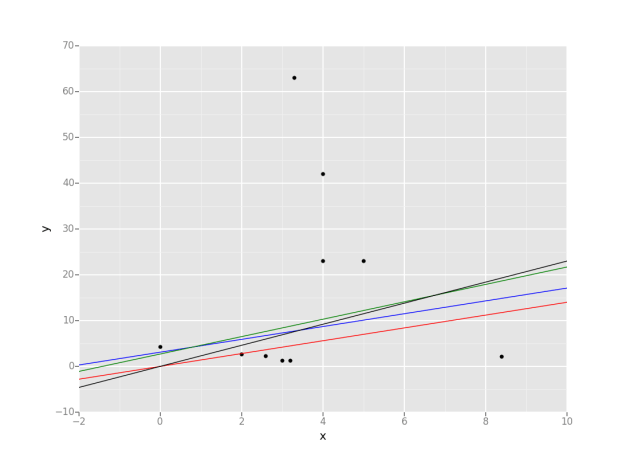
Plot some lines when we know their intercepts and slopes. Data points are random though and are irrevelant at this time.
from ggplot import *
import pandas as pd
data = {'x': [0, 2, 3, 4, 5, 4, 3.2, 3.3, 2.6, 8.4],
'y': [4.2, 2.6, 1.2, 23, 23, 42, 1.2, 63, 2.3, 2.1],
}
df = pd.DataFrame(data)
g = ggplot(df, aes(x='x', y='y')) + \
geom_point() + \
geom_abline(intercept=0, slope=1.4, colour=&amp;quot;red&amp;quot;) \
+ geom_abline(intercept=3.1, slope=1.4, colour=&amp;quot;blue&amp;quot;) \
+ geom_abline(intercept=2.7, slope=1.9, colour=&amp;quot;green&amp;quot;) \
+ geom_abline(intercept=0, slope=2.3, colour=&amp;quot;black&amp;quot;)
print(g)


Q2

Emacs haskell-mode

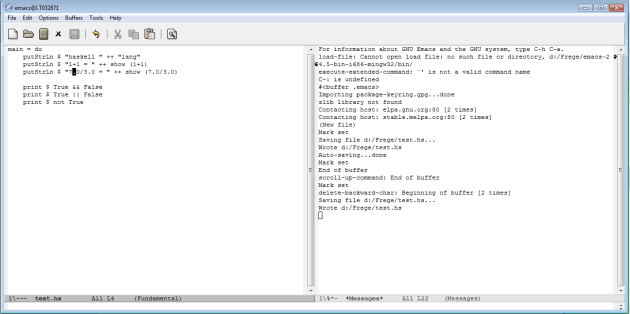
I set about installing emacs and its haskell-mode based on emacs-haskell-tutorial. But this is what worked for me. This is only part of the process and I will add any new information I come across.

Eval: (find-file user-init-file)

Press Enter. It loads my .emacs file if it is there.Create one and save it if it isn’t there.


This section should be enough if there is no proxy.

(require ‘package)
(add-to-list ‘package-archives
‘(“melpa-stable” . “http://stable.melpa.org/packages/&#8221;) t)
(package-initialize)

Corporate proxy

If there is a proxy add this section too.

(setq url-proxy-services
‘((“no_proxy” . “^\\(localhost\\|10.*\\)”)
(“http” . “proxy.cognizant.com:6050”)
(“https” . “proxy.cognizant.com:6050”)))

(setq url-http-proxy-basic-auth-storage
(list (list “proxy.cognizant.com:6050”
(cons “Credentials !”
(base64-encode-string “user:password”)))))

cabal

Cabal seems to be the package manager for Haskell libraries.

I had cabal.exe locally and realized it is not the correct way.

D:\Frege>..\Downloads\cabal update
Downloading the latest package list from hackage.haskell.org
Note: there is a new version of cabal-install available.
To upgrade, run: cabal install cabal-install

D:\Frege>ghc-pkg list Cabal
D:/Haskell Platform/7.10.3\lib\package.conf.d:
Cabal-1.22.5.0

D:\Frege>..\Downloads\cabal install happy
cabal: The program ghc version >=6.4 is required but it could not be found.

So I installed Haskell Platform and added the bin folder to the PATH.

Everything worked after that.

D:\Frege>cabal install cabal-install
Resolving dependencies…
Downloading cabal-install-1.22.9.0…
Configuring cabal-install-1.22.9.0…
Building cabal-install-1.22.9.0…
Linking dist\build\cabal\cabal.exe …
Installing executable(s) in C:\Users\476458\AppData\Roaming\cabal\bin
Installed cabal-install-1.22.9.0

D:\Frege>cabal
cabal: no command given (try –help)

D:\Frege>cabal –version
cabal-install version 1.22.6.0
using version 1.22.5.0 of the Cabal library

D:\Frege>ls
HaskellPlatform-7.10.3-x86_64-setup.exe InstallCert.java
InstallCert$SavingTrustManager.class emacs-24.5-bin-i686-mingw32
InstallCert.class emacs-24.5-bin-i686-mingw32.zip

D:\Frege>cabal update
Downloading the latest package list from hackage.haskell.org

D:\Frege>cabal install happy
Resolving dependencies…
Downloading happy-1.19.5…
[1 of 1] Compiling Main ( C:\Users\476458\AppData\Local\Temp\cabal-t
Linking dist\build\happy\happy.exe …
Installing executable(s) in C:\Users\476458\AppData\Roaming\cabal\bin
Installed happy-1.19.5

Haskell-mode

Not yet sure if the mode is effective. I don’t see any syntax highlighting yet.

haskell-mode

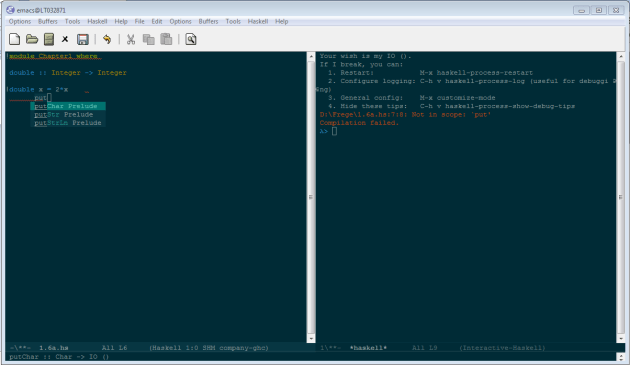
Update : Now it looks better

proper-haskell-mode

Practicing Predictive Analytics using “R”

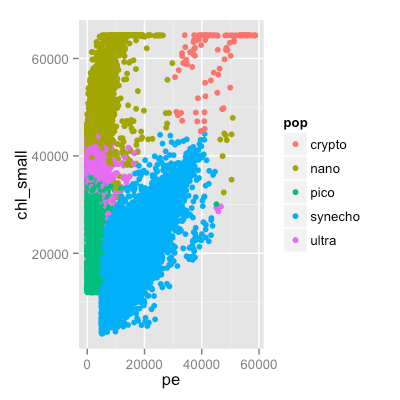
I spent a Sunday on this code to answer some questions for a Coursera course. At this time this code is the norm in more than one such course. So I am just  building muscle memory. I type this code and look at the result and learn what I learnt earlier.

If I don’t remember how to solve it I search but the point is that I have to be constantly in touch with “R” as well the fundamentals. My day job doesn’t let me do this. The other option is a book on Machine Learning like the one by Tom Mitchell but that takes foreover.

setwd("~/Documents/PredictiveAnalytics")

library(dplyr)  
library(ggplot2)
library(rpart)
library(tree)
library(randomForest)
library(e1071)
library(caret)


seaflow <- read.csv(file="seaflow_21min.csv",head=TRUE)
final <-filter(seaflow, pop == "synecho")
print(nrow(final))
print( summary(seaflow))


print ( nrow(seaflow))

print( head(seaflow))

set.seed(555)
trainIndex <- createDataPartition( seaflow$file_id, p = 0.5, list=FALSE, times=1)
train <- seaflow[ trainIndex,]
test <- seaflow[ -trainIndex,]


print(mean(train$time))

p <- ggplot( seaflow, aes( pe, chl_small, color = pop)) + geom_point()
dev.new(width=15, height=14)
print(p)
ggsave("~/predictiveanalytics.png", width=4, height=4, dpi=100)
fol <- formula(pop ~ fsc_small + fsc_perp + fsc_big + pe + chl_big + chl_small)
model <- rpart(fol, method="class", data=train)
print(model)
#plot(model)
#text(model, use.n = TRUE, all=TRUE, cex=0.9)

testprediction <- predict( model, newdata=test, type="class")
comparisonofpredictions <- testprediction == test$pop
accuracy <- sum(comparisonofpredictions) / length(comparisonofpredictions)

print( accuracy )

randomforestmodel <- randomForest( fol, data = train)
print(randomforestmodel)

testpredictionusingrandomforest <- predict( randomforestmodel, newdata=test, type="class")
comparisonofpredictions <- testpredictionusingrandomforest == test$pop
accuracy <- sum(comparisonofpredictions) / length(comparisonofpredictions)
print( accuracy )

print(importance(randomforestmodel))

svmmodel <- svm( fol, data = train)

testpredictionusingsvm <- predict( svmmodel, newdata=test, type="class")
comparisonofpredictions <- testpredictionusingsvm == test$pop
accuracy <- sum(comparisonofpredictions) / length(comparisonofpredictions)
print( accuracy )

predictiveanalytics

StatET for R

I have probably done this a hundred times but still recording these steps is useful.
So apart from installation of R and Eclipse and the StatEt plugin these are the other steps to use R in eclipse.

PATH
C:\Program Files\Java\jdk1.7.0_75\jre\bin

JAVA_HOME
C:\Program Files\Java\jdk1.7.0_75

> install.packages(c(“rj”, “rj.gd”), repos=”http://download.walware.de/rj-2.0&#8243;)
trying URL ‘http://download.walware.de/rj-2.0/bin/windows/contrib/3.2/rj_2.0.4-2
.zip’
Content type ‘application/zip’ length 378433 bytes (369 KB)
downloaded 369 KB

trying URL ‘http://download.walware.de/rj-2.0/bin/windows/contrib/3.2/rj.gd_2.0.
0-1.zip’
Content type ‘application/zip’ length 93519 bytes (91 KB)
downloaded 91 KB

package ‘rj’ successfully unpacked and MD5 sums checked
package ‘rj.gd’ successfully unpacked and MD5 sums checked

The downloaded binary packages are in
C:\Users\476458\AppData\Local\Temp\RtmpCsk978\downloaded_packages

Cubie Board 4 unboxing

https://www.youtube.com/watch?v=JI26sSnfYT8

As part of my effort to code OCaml and create a Unikernel I was introduced to https://mirage.io/ and that in turn lead me to http://cubieboard.org/. I still don’t know if Cubie board 4 can be used to do what they have done using the earlier versions of the hardware. I have to try

Microsoft: Data Science and Machine Learning Essentials

edxAfter completing this edX course successfully I identified these questions which I answered wrongly. In some cases I selected more than the required options due to oversight.

I have marked the likely answers.

I need a longer article to explain what I learnt which I plan to write soon.

You have amassed a large volume of customer data, and want to determine if it is possible to identify distinct categories of customer based on similar characteristics.

What kind of predictive model should you create?

    1. Regression
    2. Clustering
    3. Recommender
    4. Classification

You discover that there are missing values for an unordered numeric column in your data.
Which three approaches can you consider using to treat the missing values?

    1. Substitute the text “None”.
    2. Forward fill or back fill the value.
    3. Remove rows in which the value is missing.
    4. Interpolate a value to replace the missing value.
    5. Substitute the numeral 0

When assessing the residuals of a regression model you observe the following:

Residuals exhibit a persistent structure and are not randomly distributed with respect to values of the label or the features.
The Q-Q normal plots of the residuals show significant curvature and the presence of outliers.
Given these results, which two of the following things should you try to improve the model?

    1. Cross validate the model to ensure that it will generalize properly.
    2. Try a different class of regression model that might better fit the problem should be tried.
    3. Create some engineered features with behaviors more closely tracking the values of the label.
    4. Add a Sweep Parameters module with the Metric for measuring performance for classification property set to Accuracy.

You create an experiment that uses a Train Matchbox Recommender module to train a recommendation model, and add a Score Matchbox Recommender module to generate a prediction. You want to use the model in a music streaming service to recommend songs for the currently logged in user.Which recommender prediction kind should you configure the Score Matchbox

Recommender module to use?

    1. Item Recommendation
    2. Related Items
    3. Rating Prediction
    4. Related Users

While exploring a dataset you discover a nonlinear relationship between certain features and the label.Which two of the following feature engineering steps should you try before training a supervised machine learning model?


1. Ensure the features are linearly independent.
2. Compute new features based on polynomial values of the original features.
3. Compute mathematical combinations of the label and other features.
4. Compute new features based on logarithms or exponentiation of these original features.

Which two of the following approaches can you use to determine which features to prune in an Azure ML experiment?

    1. Use the Permutation Feature Importance model to identify features of near-zero importance.
    2. Use the Cross Validation module to identify folds which indicate the model does not generalize well.
    3. Prune features one at a time to find features which reduce model performance or have no impact on model performance as measured with the Evaluate Model module.
    4. Use the Split module to create training, test and evaluation data sub-sets to evaluate model performance.